Quelques détails sur notre demande
L'équipe de développement de Paratext Lite recherche des âmes courageuses qui utilisent à la fois Paratext Lite et Project Plans (Plans de projet) de Paratext et qui seraient disposées à tester cette nouvelle fonctionnalité dans Paratext Lite.
Fonctionnement
-
D'abord, déroulez le menu Outils pour le projet et sélectionnez « Open My Tasks » (Ouvrir mes tâches)
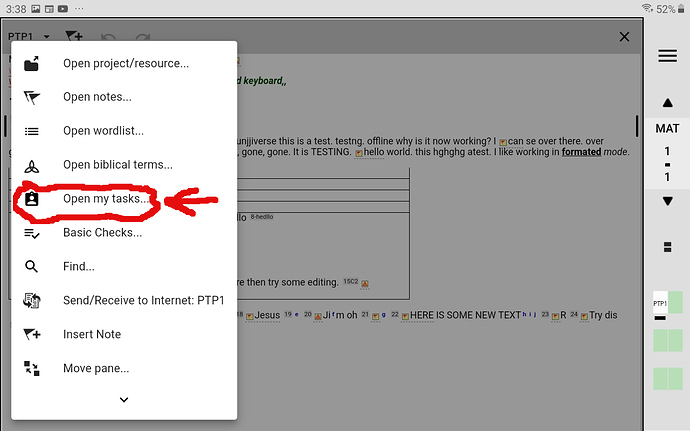
MyTasks1280×800 155 KB
-
Après avoir sélectionné le projet pour lequel vous souhaitez voir My Tasks (Mes tâches), vous verrez cette boîte de dialogue :
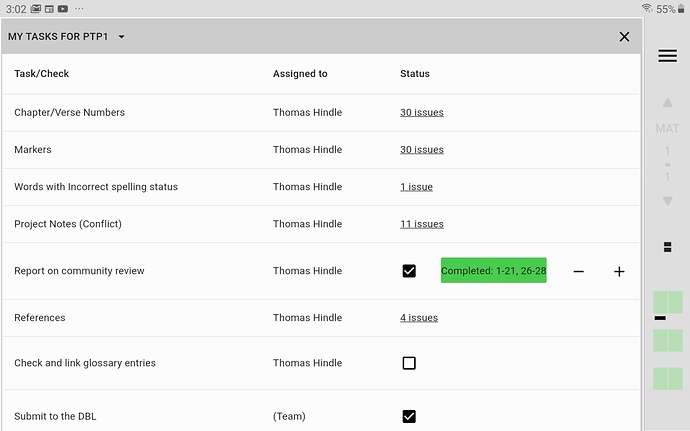
My Tasks1280×800 113 KB
-
Si vous cliquez sur la « barre de tâches terminées de couleur verte », vous verrez l'écran suivant :
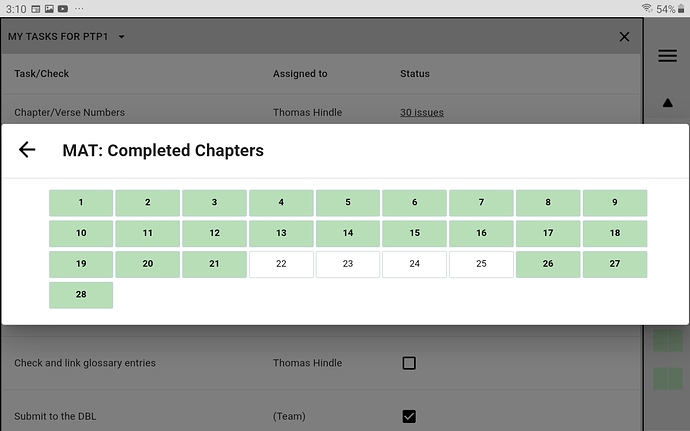
CompletedChapters1280×800 123 KB
Merci beaucoup d'avoir envisagé d'aider de cette manière,
anon089134 (au nom de l'équipe)
Some details about our ask
The Paratext Lite development team is on the lookout for some brave souls who use both Paratext Lite and Project Plans from Paratext and would be willing to test out this new feature in Paratext Lite.
How it works
-
First drop down the tools menu for the project and select “Open My Tasks”
MyTasks1280×800 155 KB
-
After selecting which project you wish to see My Tasks for, you will see this dialogue:
My Tasks1280×800 113 KB
-
If you click on the “green coloured Completed task bar”, you will see the following screen:
CompletedChapters1280×800 123 KB
Thanks so much for considering helping in this way,
anon089134 (for the team)
Traduit automatiquement depuis English








