Beberapa detail tentang permintaan kami
Tim pengembang Paratext Lite sedang mencari jiwa-jiwa pemberani yang menggunakan baik Paratext Lite maupun Project Plans dari Paratext dan bersedia menguji fitur baru ini di Paratext Lite.
Cara kerjanya
-
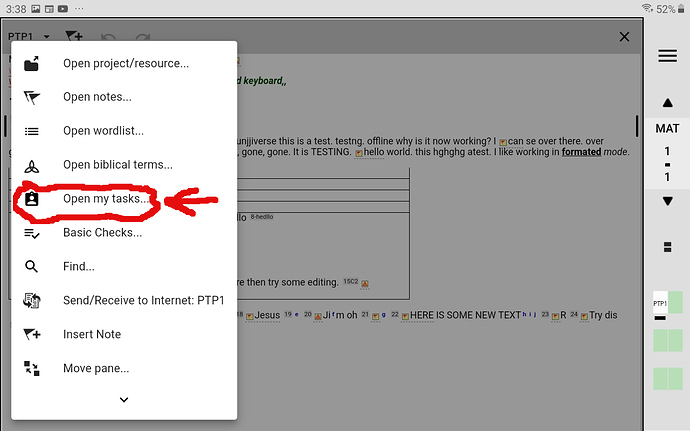
Pertama, buka menu tools untuk proyek tersebut dan pilih “Open My Tasks”
MyTasks1280×800 155 KB
-
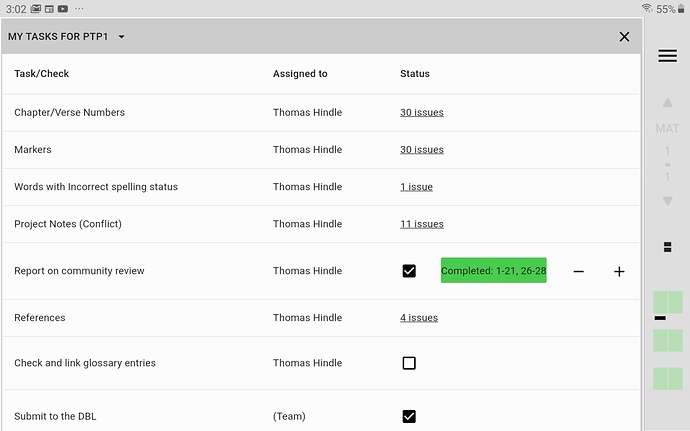
Setelah memilih proyek mana yang ingin Anda lihat My Tasks-nya, Anda akan melihat dialog ini:
My Tasks1280×800 113 KB
-
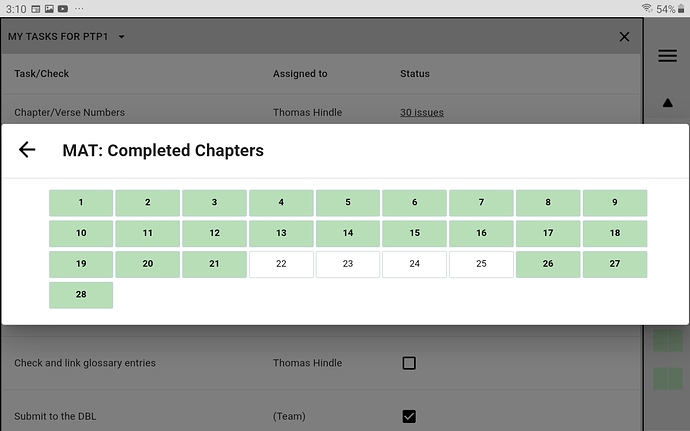
Jika Anda mengklik “bilah tugas selesai berwarna hijau”, Anda akan melihat layar berikut:
CompletedChapters1280×800 123 KB
Terima kasih banyak atas pertimbangan Anda untuk membantu dengan cara ini,
anon089134 (untuk tim)
Some details about our ask
The Paratext Lite development team is on the lookout for some brave souls who use both Paratext Lite and Project Plans from Paratext and would be willing to test out this new feature in Paratext Lite.
How it works
-
First drop down the tools menu for the project and select “Open My Tasks”
MyTasks1280×800 155 KB
-
After selecting which project you wish to see My Tasks for, you will see this dialogue:
My Tasks1280×800 113 KB
-
If you click on the “green coloured Completed task bar”, you will see the following screen:
CompletedChapters1280×800 123 KB
Thanks so much for considering helping in this way,
anon089134 (for the team)
Diterjemahkan secara otomatis dari English








