0 votes
500 vues

Clicking a Note in a Project’s Notes doesn’t move the resource to the reference of the Note. It would be super handy if the hyperlinks worked (as they do in PTHeavy).

Ancienne publication - affichée dans sa langue d'origine
Paratext Lite par (642 points) | 500 vues

3 Réponses

0 votes
Meilleure réponse

Maybe I’m misunderstanding, but resources and notes sync for me.

Starting with this:
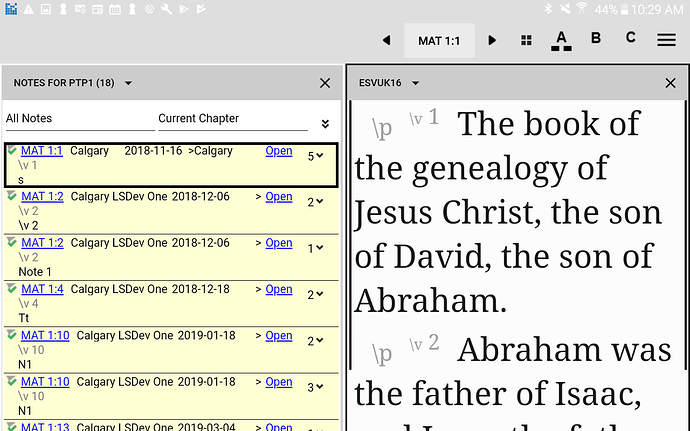
I then scroll down the notes list and click on MAT 1:18 in one of the notes:
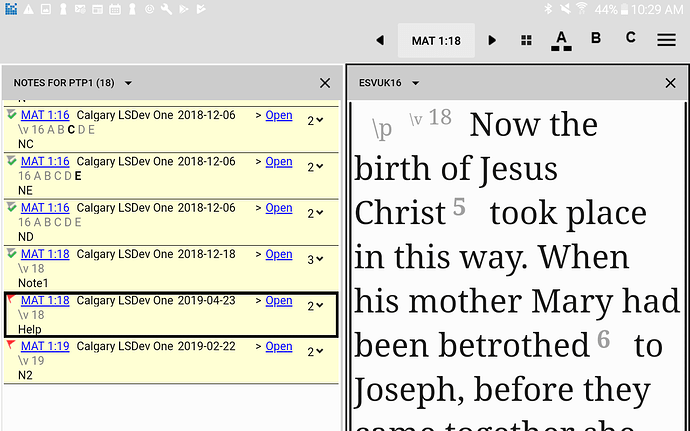
The resource in the right pane scrolls to verse 18.

Does that match the behavior you think should be happening? If so could you submit a problem report with the latest beta, and we can examine the particular notes list and resources that you are using.

Thanks

Ancienne publication - affichée dans sa langue d'origine
par [Moderator]
(2,4k points)

Yeah, that’s what I would expect should happen. Unfortunately, it doesn’t… The reference changes in the reference box in the menu bar, but none of the open resources go there. Also, scrolling with the arrows beside the reference box on the menu bar doesn’t move the resources in sync. Actually, it doesn’t move /any/ resource. :frowning: Options > “Navigate each pane independently” is not selected.

Feedback submitted.

Paul

Ancienne publication - affichée dans sa langue d'origine
0 votes

@Paul

In Options could you re select “Show markers in editable projects”?

After doing this does your Resource now sync?

Ancienne publication - affichée dans sa langue d'origine
par [Moderator]
(2,4k points)

No difference… I tried toggling
“Navigate independently” on / off as well, but that didn’t work
either.

Ancienne publication - affichée dans sa langue d'origine
0 votes

oh ok :frowning: - There is a bug fix in 8.1.3.44 that fixes verse syncing when “Show markers in editable projects” is unselected.
I did try with your project + open resources, but was unable to find any further problems.

Perhaps you could try when you get the 8.1.3.44 update just in case it fixes things for you.

Thanks

Ancienne publication - affichée dans sa langue d'origine
par [Moderator]
(2,4k points)

I just updated from 8.1.3.43 to
.46. Still no synchronised scrolling, even after a restart…

    Paul
Ancienne publication - affichée dans sa langue d'origine

Ditto with 8.1.3.51–update, restart tablet, no synchronised scrolling. Even the scroll arrows don’t work…

Ancienne publication - affichée dans sa langue d'origine

Questions connexes

0 votes
2 réponses 277 vues
In a back translation project one of the books seems to have gone. When I go to the book of John I only get ... the message in it, and now clicking on that message does nothing.
anon317109 119 posée juil. 17, 2018
0 votes
1 réponse 63 vues
J'ai un fil de note qui ne peut pas être résolu. Il traîne depuis près de trois ans maintenant, donc j'en ai ... toute aide que vous pourrez m'apporter à ce sujet. John Nystrom
john_nystrom 312 posée avr. 20
0 votes
1 réponse 215 vues
Yes, if someone adds a comment to a note there is a very high probability it means they think it needs to be discussed ... make it unresolved they have a one click way to do that.
anonyme posée mai 7, 2015
0 votes
2 réponses 335 vues
One of our users is having this odd experience where sometimes, but not often, the text box of a note appears black. ... on how to fix this? 20170825_143915.jpg3264 2448 1.64 MB
MSEAIT_LT 478 posée août 28, 2017
0 votes
1 réponse 220 vues
(anon451647 writes) Is there any special significance to the colors chosen for the note icons?
anonyme posée avr. 10, 2015
Welcome to Support Bible, where you can ask questions and receive answers from other members of the community.
Accept the one whose faith is weak, without quarreling over disputable matters.
Romans 14:1
3,049 questions
6,007 réponses
5,672 commentaires
2,029 utilisateurs





