0 votes
1,1k vues

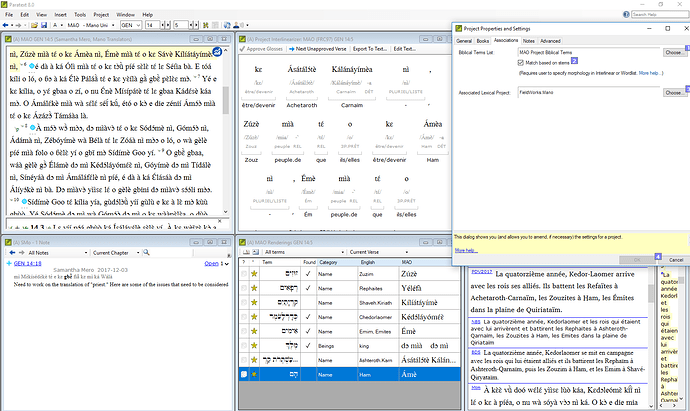
I am trying to use the Match Based on Stems tool in my project, but it does not seem to be working. I have “Match based on stems” checked in Project Properties and Settings. You can see from the screenshot that I have identified the morphology for the name “Ham” (the city) in the interlinear, and that in this verse it has a determiner on it. In the Renderings tool, I have listed only the stem “Ham.” It is my understanding that this should be approved because “Ham” is in the morphology. However, you can see that it is not approved, nor are any of the other city names in the verse because they all have determiners.

If I uncheck “Match based on stems,” all of these will be approved because the determiner is listed in my list of affixes. So, that method works. However, I would prefer to use match based on stems, as it should be more accurate, and I have to make an interlinear for the consultant anyway, so there is really no more work involved. Can anyone help me get this to work?


Ancienne publication - affichée dans sa langue d'origine
Paratext par (155 points) | 1,1k vues

10 Réponses

0 votes
Meilleure réponse

anon044949,

Thank you for your input. That’s the way the process is supposed to work. But it’s not working in my project for some reason. I shouldn’t need to approve the morphology in both the Wordlist and the Interlinear. Approving in one should automatically approve in the other. And it does. Here is a screenshot of my Wordlist showing Ámèa as correctly parsed:

But for some reason, Renderings still won’t approve the root “Ámè.”

Ancienne publication - affichée dans sa langue d'origine
par (155 points)

anon807810, this may not have anything to do with your problem, but I think it’s worth a mention. I see you have diacritics. Is your project Normalized or not (go to Project Properties and Settings, Advanced Tab, Normalization)? If not, are these diacritics, the accents on á, etc, decomposed characters (i.e. a sequence of two characters, the a and the acute accent, in Unicode)? If they are, then it may be that this issue is causing the Match Based on Stems not to work? You are welcome to contact me off list, and we could discuss this further.

Ancienne publication - affichée dans sa langue d'origine

anon807810,

You are correct that one can use either the word list tool or the interlinearizer. I prefer the word list tool so that I can see all the words with the same root/stem. It is your choice of course. Paratext often has more than one way to do things to suit a wider range of needs.

Ancienne publication - affichée dans sa langue d'origine
0 votes

Looks like a bug in Paratext. Could you use Help > Report a problem to report the issue to us?

Ancienne publication - affichée dans sa langue d'origine
par [Expert]
(16,7k points)
0 votes

OK, I have done so. Has anyone else reported this problem or is it just a problem with my copy?

Ancienne publication - affichée dans sa langue d'origine
par (155 points)
0 votes

I don’t know of any other reports, but I’m also not sure that many projects use the feature since it didn’t work well in PT7.
Since this is blocking your work and I suspect it to be an easy fix, it should be a high priority for us to fix it.

Since I, as an English-only speaker, have a hard time seeing subtle differences in non-English text, can you confirm that all three names shown in your screenshot should be matching?

Ancienne publication - affichée dans sa langue d'origine
par [Expert]
(16,7k points)

réaffiché
0 votes

You mean the three names that aren’t checked as “found”? Yes, they should all be checked. In the Interlinearizer, you can see the word Ámèa and that this is made up of the name Ámè plus the determiner -a. Then, at the bottom of the Renderings box, Ámè is listed as the rendering for the name Ham. So this should be checked, but it’s not. The exact same thing is happening for the other two names. They all have a determiner on them.

Ancienne publication - affichée dans sa langue d'origine
par (155 points)
0 votes

I have gotten this to work and made some training material on this. I will review it and try and help you tomorrow.

Ancienne publication - affichée dans sa langue d'origine
par [Expert]
(2,9k points)

Ok, Sorry but I needed to review the process. I had not thought about it for a while. I think the step you are missing is to go to the Word list tool, click on view morphology and begin marking the morphemes. Only word parses that are approved, i.e. black, will be used by the project interlinearizer. The red parses are only guesses and will not be used by the project interlinearizer. Below is a screen shot of the Word list tool with the morphology column visible. I have a video that shows this method and three others to teach the Biblical terms tool the morphemes of a language if you need more help.

After you have approved the morphemes in either the word list tool or the project interlinearizer, then you will have to go to the Biblical terms tool and approve the stem/root for each term. In the case shown in the above screen capture, I approved “veny” as the rendering of “raise/ἐγείρω”. Paratext does the rest and approves all the renderings for ἐγείρω with the root “veny”!

Ancienne publication - affichée dans sa langue d'origine
0 votes

The problem was deep inside Paratext (not a problem with their project). It was doing a cased compare with the stem and one was uppercased and the other was lowercased. This has been fixed and should be in the next update.

Ancienne publication - affichée dans sa langue d'origine
par [Expert]
(16,7k points)

If the problem is related to the ability to ignore case, I admit that when I have used the stem matching, I never tried cases where case would be an issue. My special area of research is in Bantu languages where mixed capitalization is often allowed in the orthography. Thank you anon807810 for finding this bug.

Ancienne publication - affichée dans sa langue d'origine
0 votes

Thanks for your help, everyone.
anon758749: The project normalization is decomposed, yes. I changed this when PT8 came out to fix a problem with the Wordlist listing the same word multiple times. I hope I didn’t fix one problem only to create another.

anon291708: I hope you’re right that this will fix the problem, though I don’t understand why it would. Nothing was lower case. Ámè is a proper name and is always upper case, both in the text and the Renderings. But I know nothing of programing, so I probably just don’t understand what you mean.

anon807810

Ancienne publication - affichée dans sa langue d'origine
par (155 points)

This was deep in the code where it was doing a comparison to the lexicon entry. Lexicon entries are stored all lowercase for the interlinear, internally. In this particular instance, we forgot that fact and did a direct compare instead of a caseless compare.

Ancienne publication - affichée dans sa langue d'origine

Gotcha! (I think.) Anyway, I will look forward to the next update.

Ancienne publication - affichée dans sa langue d'origine
0 votes

The fix should be in 8.0.100.67 which should be going out to everyone soon.

Ancienne publication - affichée dans sa langue d'origine
par [Expert]
(16,7k points)

Very great that you could diagnose the problem and fix it. Sometimes bugs that only show up in very specific and rare situations are hard to interpret.

Ancienne publication - affichée dans sa langue d'origine
0 votes

4 posts were split to a new topic: Biblical Term counts not updating

Ancienne publication - affichée dans sa langue d'origine
par [Expert]
(16,7k points)

Questions connexes

0 votes
1 réponse 212 vues
I'm working with a language where words with prefixes and suffixes can be reduplicated to show plurality. A - ... this or is it something beyond Paratext's current capabilities?
fhardison8588 111 posée déc. 12, 2022
0 votes
1 réponse 145 vues
Hello, I'm writing on behalf of a teammate who is having a strange issue with the Interlinearizer for his ... files to the Assignments and Progress window? Any help appreciated.
KmSilvey 109 posée nov. 14, 2022
0 votes
2 réponses 271 vues
I would like to make sure that every verse is approved by at least two members of the team. Previously, we used ... a way to hack the back translation functionality to do this?
bit 495 posée avr. 19, 2022
0 votes
4 réponses 1,6k vues
I'm going to tip my hand here in terms of my ignorance of Hebrew, but I'm trying to figure out how to find ... the Vimeo videos for anything to help, but haven't found anything.
Paul 642 posée févr. 3, 2021
0 votes
4 réponses 625 vues
The project runs fine on a stem-based setup for several weeks now. The language produces many compound words. They can ... stem meaning mother and over the prefix meaning μέγας.)
Tim 934 posée avr. 24, 2019
Welcome to Support Bible, where you can ask questions and receive answers from other members of the community.
So Peter was kept in prison, but the church was earnestly praying to God for him.
Acts 12:5
3,044 questions
6,004 réponses
5,671 commentaires
2,026 utilisateurs





