你好 Connor,
看起来其中一本书的数据中有些内容导致了问题。我看到你正在处理 GEN-REV。你能找出是哪本书出了问题吗?尝试搜索错误消息中的那段希伯来语文本,如果搜索不到,请查看 View+Edit 页面的 XeTeX Log 选项卡,看看日志末尾是否有关于哪些书已完成(从而推断出哪本书导致问题)的提示。
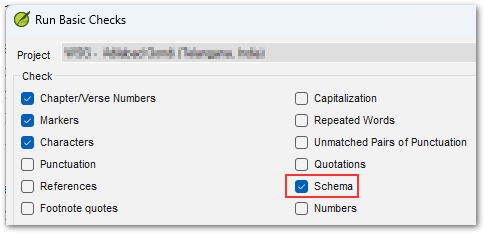
很可能是在该文本之前或之后的数据中有些“不同”之处。这可能只是节号后缺少空格,或者缺少标记等简单问题。请注意,你还可以在 Paratext 中运行架构检查(Schema checks)以确保数据完整性。要访问此特殊检查,你需要在点击菜单选项“Run Basic Checks...”时按住 Shift 键,然后你会看到一个名为 Schema 的额外选项,它将提供有关任何数据结构完整性问题的非常详细的信息。
如果你仍然无法解开这个谜团,请使用帮助页面/选项卡上的“Create Archive...”按钮创建一个 ZIP 文件归档,并通过电子邮件发送到 ptxprint_support (at) sil.org,我会查看一下(我更喜欢只包含导致问题的单本书的归档,而不是所有 66 本书)。
Hi Connor,
It appears that there is something in the data of one of the books that is tripping it up. I see that you're doing GEN-REV. Are you able to work out which book is the culprit? Try searching for the string of Hebrew text (from the error message) and if that fails, look at the XeTeX Log tab of the View+Edit page to see if the end of the log gives you a hint about which books were complete, and therefore which one tripped it up.
It is likely that something in the data just before, or just after that text is "different". It could be something as simple as a space missing after a verse number, or a missing marker etc. Note that you can also run the Schema checks in Paratext to ensure data-integrity. To access this special check, you need to hold Shift when you click on the menu option, "Run Basic Checks...", then you'll see an additional option called Schema which will provide very detailed information about any data structure integrity issues.
If you still can solve the mystery, then please use the "Create Archive..." button on the Help page/tab to make a ZIP file archive and send it by email to ptxprint_support (at) sil.org and I'll take a look (I would prefer an archive with just the single book causing the issue, rather than all 66 books).
机器翻译自 English








