Hola, Connor:
Parece que hay algo en los datos de uno de los libros que está causando el problema. Veo que estás trabajando con GEN-REV. ¿Puedes averiguar qué libro es el culpable? Intente buscar la cadena de texto en hebreo (del mensaje de error) y, si eso falla, mire la pestaña XeTeX Log de la página View+Edit para ver si el final del registro le da una pista sobre qué libros se completaron y, por lo tanto, cuál causó el problema.
Es probable que algo en los datos justo antes o justo después de ese texto sea "diferente". Podría ser algo tan simple como un espacio faltante después de un número de versículo, o un marcador faltante, etc. Tenga en cuenta que también puede ejecutar las verificaciones de esquema (Schema checks) en Paratext para garantizar la integridad de los datos. Para acceder a esta verificación especial, debe mantener presionada la tecla Shift cuando haga clic en la opción del menú "Run Basic Checks...", luego verá una opción adicional llamada Schema que proporcionará información muy detallada sobre cualquier problema de integridad de la estructura de datos.
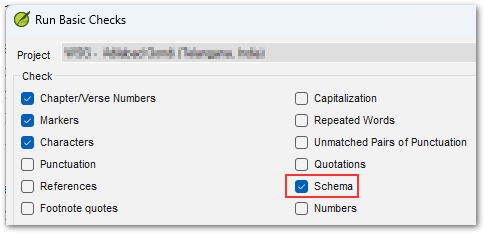
Si aún no puede resolver el misterio, use el botón "Create Archive..." en la página/pestaña de Ayuda para crear un archivo ZIP y envíelo por correo electrónico a ptxprint_support (at) sil.org y lo revisaré (preferiría un archivo con solo el libro que causa el problema, en lugar de los 66 libros).
Hi Connor,
It appears that there is something in the data of one of the books that is tripping it up. I see that you're doing GEN-REV. Are you able to work out which book is the culprit? Try searching for the string of Hebrew text (from the error message) and if that fails, look at the XeTeX Log tab of the View+Edit page to see if the end of the log gives you a hint about which books were complete, and therefore which one tripped it up.
It is likely that something in the data just before, or just after that text is "different". It could be something as simple as a space missing after a verse number, or a missing marker etc. Note that you can also run the Schema checks in Paratext to ensure data-integrity. To access this special check, you need to hold Shift when you click on the menu option, "Run Basic Checks...", then you'll see an additional option called Schema which will provide very detailed information about any data structure integrity issues.
If you still can solve the mystery, then please use the "Create Archive..." button on the Help page/tab to make a ZIP file archive and send it by email to ptxprint_support (at) sil.org and I'll take a look (I would prefer an archive with just the single book causing the issue, rather than all 66 books).
Traducción automática desde English








