Olá @kentS - Sim, claro que existe. Mas tive que pausar um momento para lembrar onde escondemos isso recentemente!
Antigamente, era uma configuração global nas opções de Sistema de Escrita, disponível na aba Fonts+Scripts, mas agora foi transformado em uma propriedade da fonte para que o recurso possa ser ativado/desativado em qualquer nível:
a) Para alterá-lo globalmente, selecione a fonte primária (Body Text) e altere-a na opção que aparece na parte inferior da caixa de diálogo do seletor de fontes:
b) Para alterar o mapeamento de dígitos (Digit Mapping) no nível do estilo de Parágrafo (ou mesmo de Caractere), use o botão Set Font e, em seguida, altere o Digit Mapping apenas para aquele estilo específico. A propósito - esse recurso foi adicionado porque certas pessoas pediram por cabeçalhos em vários idiomas - cada um com dígitos diferentes, então tivemos que ser capazes de ligar/desligar isso no nível do estilo, bem como globalmente.
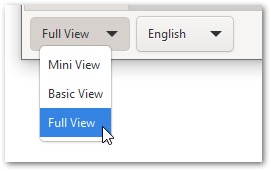
Oh, e se não aparecer em nenhum desses diálogos, significa apenas que você está usando o Mini View ou o Basic View; e essas configurações avançadas estão disponíveis apenas no Full View (canto inferior esquerdo do diálogo principal).
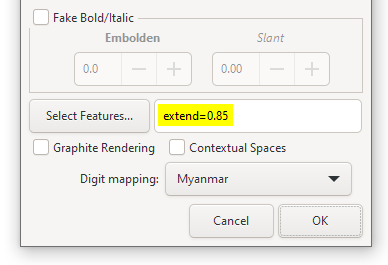
E, já que estamos neste diálogo, posso compartilhar que existe um recurso de fonte menos conhecido chamado extend, que pode ser usado para esticar ou encolher uma fonte horizontalmente. Então, por exemplo, aqui a fonte será encolhida para 85% de sua largura normal:
Para aumentar a fonte, use extend=1.05 e ela será esticada para 105%
P.S. Parece haver uma regressão. Não consigo fazer os dígitos do \h1 serem estilizados de forma diferente por mim mesmo. Corrigiremos o mais rápido possível e enviaremos uma atualização (DV hoje à noite).
Hi @kentS - Yes, of course there is. But I had to pause for a moment to remember where we hid it recently!
It used to be a global setting in the Writing System options which was available on the Fonts+Scripts tab, but has now been made a font property so that the feature can be enabled/disabled at any level:
a) To change it globally, select the primary font (Body Text) and change it in the option that appears at the bottom of the Font picker dialog:
b) To change the Digit mapping at the Paragraph (or even Character) style level, use the Set Font button, and then change the Digit Mapping just for that particular style. BTW - this feature was added because certain people asked for headers in multiple languages - each with different digits, so we had to be able to turn this on/off at the style level as well as globally.
Oh, and if it doesn’t appear on either of these dialogs, it just means that you’re using at the Mini View, or the Basic View; and these advanced settings are only available in the Full View (bottom left of main dialog).
And while we’re in this dialog, I might as well share that there is a lesser-known font feature called extend which can be used to stretch or shrink a font horizontally. So, for example, here the font will shrink to 85% of its normal width:
To grow the font, use extend=1.05 and it will be stretched to 105%
PS. There seems to be a regression. I can’t get the \h1 digits to style differently myself. We’ll fix it ASAP and push an update out (DV later today).








