Hola @kentS - Sí, por supuesto que existe. ¡Pero tuve que detenerme un momento para recordar dónde lo escondimos recientemente!
Antes era una configuración global en las opciones del sistema de escritura, disponible en la pestaña Fonts+Scripts, pero ahora se ha convertido en una propiedad de la fuente para que la función se pueda activar/desactivar en cualquier nivel:
a) Para cambiarlo globalmente, seleccione la fuente principal (Body Text) y cámbielo en la opción que aparece en la parte inferior del cuadro de diálogo de selección de fuente:
b) Para cambiar el mapeo de dígitos (Digit mapping) en el nivel de estilo de Párrafo (o incluso de Carácter), use el botón Set Font y luego cambie el Digit Mapping solo para ese estilo en particular. Por cierto, esta función se agregó porque ciertas personas pidieron encabezados en varios idiomas, cada uno con diferentes dígitos, por lo que tuvimos que poder activar/desactivar esto en el nivel de estilo, además de globalmente.
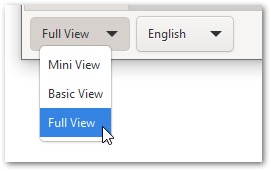
Ah, y si no aparece en ninguno de estos cuadros de diálogo, simplemente significa que está usando la Mini View o la Basic View; y estas configuraciones avanzadas solo están disponibles en la Full View (esquina inferior izquierda del diálogo principal).
Y ya que estamos en este diálogo, puedo compartir que hay una función de fuente menos conocida llamada extend que se puede usar para estirar o encoger una fuente horizontalmente. Por ejemplo, aquí la fuente se encogerá al 85% de su ancho normal:
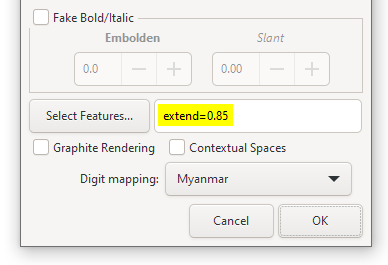
Para agrandar la fuente, use extend=1.05 y se estirá al 105%
P.D. Parece haber una regresión. No puedo lograr que los dígitos de \h1 se estilen de manera diferente por mi cuenta. Lo arreglaremos lo antes posible y publicaremos una actualización (DV más tarde hoy).
Hi @kentS - Yes, of course there is. But I had to pause for a moment to remember where we hid it recently!
It used to be a global setting in the Writing System options which was available on the Fonts+Scripts tab, but has now been made a font property so that the feature can be enabled/disabled at any level:
a) To change it globally, select the primary font (Body Text) and change it in the option that appears at the bottom of the Font picker dialog:
b) To change the Digit mapping at the Paragraph (or even Character) style level, use the Set Font button, and then change the Digit Mapping just for that particular style. BTW - this feature was added because certain people asked for headers in multiple languages - each with different digits, so we had to be able to turn this on/off at the style level as well as globally.
Oh, and if it doesn’t appear on either of these dialogs, it just means that you’re using at the Mini View, or the Basic View; and these advanced settings are only available in the Full View (bottom left of main dialog).
And while we’re in this dialog, I might as well share that there is a lesser-known font feature called extend which can be used to stretch or shrink a font horizontally. So, for example, here the font will shrink to 85% of its normal width:
To grow the font, use extend=1.05 and it will be stretched to 105%
PS. There seems to be a regression. I can’t get the \h1 digits to style differently myself. We’ll fix it ASAP and push an update out (DV later today).
Traducción automática desde English








