Halo @kentS - Ya, tentu saja ada. Tapi saya harus berhenti sejenak untuk mengingat di mana kami menyembunyikannya baru-baru ini!
Dulu ini adalah pengaturan global di opsi Writing System yang tersedia di tab Fonts+Scripts, tetapi sekarang telah dibuat sebagai properti font sehingga fitur ini dapat diaktifkan/dinonaktifkan di tingkat mana pun:
a) Untuk mengubahnya secara global, pilih font utama (Body Text) dan ubah di opsi yang muncul di bagian bawah dialog Font picker:
b) Untuk mengubah pemetaan Digit di tingkat gaya Paragraf (atau bahkan Karakter), gunakan tombol Set Font, lalu ubah Digit Mapping hanya untuk gaya tertentu tersebut. FYI - fitur ini ditambahkan karena beberapa orang meminta judul dalam beberapa bahasa - masing-masing dengan angka yang berbeda, jadi kami harus bisa mengaktifkan/menonaktifkan ini di tingkat gaya maupun secara global.
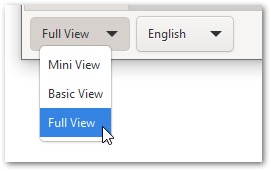
Oh, dan jika tidak muncul di salah satu dari dialog ini, itu berarti Anda menggunakan Mini View, atau Basic View; dan pengaturan lanjutan ini hanya tersedia di Full View (di bagian kiri bawah dialog utama).
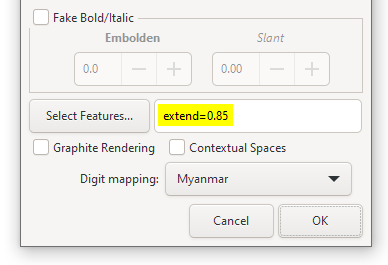
Dan sementara kita ada di dialog ini, saya mungkin bisa berbagi bahwa ada fitur font yang kurang dikenal bernama extend yang dapat digunakan untuk meregangkan atau mengecilkan font secara horizontal. Jadi, misalnya, di sini font akan menyusut menjadi 85% dari lebar normalnya:
Untuk memperbesar font, gunakan extend=1.05 dan akan diregangkan menjadi 105%
PS. Sepertinya ada regresi. Saya tidak bisa membuat angka \h1 bergaya berbeda sendiri. Kami akan memperbaikinya secepatnya dan mendorong pembaruan (DV nanti hari ini).
Hi @kentS - Yes, of course there is. But I had to pause for a moment to remember where we hid it recently!
It used to be a global setting in the Writing System options which was available on the Fonts+Scripts tab, but has now been made a font property so that the feature can be enabled/disabled at any level:
a) To change it globally, select the primary font (Body Text) and change it in the option that appears at the bottom of the Font picker dialog:
b) To change the Digit mapping at the Paragraph (or even Character) style level, use the Set Font button, and then change the Digit Mapping just for that particular style. BTW - this feature was added because certain people asked for headers in multiple languages - each with different digits, so we had to be able to turn this on/off at the style level as well as globally.
Oh, and if it doesn’t appear on either of these dialogs, it just means that you’re using at the Mini View, or the Basic View; and these advanced settings are only available in the Full View (bottom left of main dialog).
And while we’re in this dialog, I might as well share that there is a lesser-known font feature called extend which can be used to stretch or shrink a font horizontally. So, for example, here the font will shrink to 85% of its normal width:
To grow the font, use extend=1.05 and it will be stretched to 105%
PS. There seems to be a regression. I can’t get the \h1 digits to style differently myself. We’ll fix it ASAP and push an update out (DV later today).
Diterjemahkan secara otomatis dari English








