0 votes
198 views

Is there a setting to use non-Western digits in a typesetting, like Print Draft has? if so, I cannot find it. If there is not, does that mean we need to create a changes.txt file to change the digits? My use case is Myanmar.

PTXprint by (1.8k points) | 198 views

3 Answers

0 votes

Hi @kentS - Yes, of course there is. But I had to pause for a moment to remember where we hid it recently!

It used to be a global setting in the Writing System options which was available on the Fonts+Scripts tab, but has now been made a font property so that the feature can be enabled/disabled at any level:

a) To change it globally, select the primary font (Body Text) and change it in the option that appears at the bottom of the Font picker dialog:

b) To change the Digit mapping at the Paragraph (or even Character) style level, use the Set Font button, and then change the Digit Mapping just for that particular style. BTW - this feature was added because certain people asked for headers in multiple languages - each with different digits, so we had to be able to turn this on/off at the style level as well as globally.

Oh, and if it doesn’t appear on either of these dialogs, it just means that you’re using at the Mini View, or the Basic View; and these advanced settings are only available in the Full View (bottom left of main dialog).
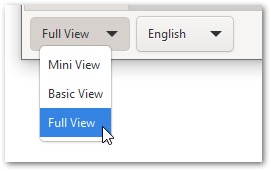
image

And while we’re in this dialog, I might as well share that there is a lesser-known font feature called extend which can be used to stretch or shrink a font horizontally. So, for example, here the font will shrink to 85% of its normal width:
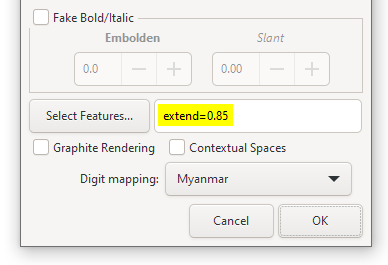
image

To grow the font, use extend=1.05 and it will be stretched to 105%

PS. There seems to be a regression. I can’t get the \h1 digits to style differently myself. We’ll fix it ASAP and push an update out (DV later today).


by (3.2k points)
reshown
0 votes

Thanks @mjpenny. It is easy to find when you know where it is! Also is a great feature that you can have both types of digits.

by (1.8k points)
0 votes

Mark,
That worked for the verse numbers by modifying \v style but not for the chapter numbers by modifying \c style. Mike

by (1.2k points)

Related questions

0 votes
1 answer 272 views
I want to break a section heading differently, so as not to split a phrase: Change to I can achieve this by entering a ... UTF code into changes.txt, as in my GEN 23:2 example?
KimB 670 asked Jul 2, 2024
0 votes
2 answers 29 views
Can someone help walk me through setting up and using a diglot? I have downloaded several resources onto ... Public Domain English translations/our own project back translation?
Jordan K 110 asked Apr 6
0 votes
1 answer 14 views
I want to use \fm \fm* for two footnote callers in John 5:10 and John 5:18 with the same keyword in the main text ... Jews in the context of John 5 is the leadership of the Jews.
Y Mdu Niê 124 asked Jan 24
0 votes
9 answers 762 views
I looked and couldn’t find any documentation or videos on how to use the “Cover” tab. I especially want to know how to create and add the content for that tab.
Yancey_Yarick 102 asked Apr 13, 2023
0 votes
2 answers 55 views
I have a project that uses question and exclamation opening punctuation similar to Spanish's and . Although I can use ... I might mark them invalid? Thank you in advance! fork
Fork 184 asked Nov 14, 2024
Welcome to Support Bible, where you can ask questions and receive answers from other members of the community.
Make every effort to keep the unity of the Spirit through the bond of peace.
Ephesians 4:3
3,037 questions
5,995 answers
5,661 comments
2,022 users





