谢谢 Dan 提出这个好问题。欢迎来到社区!
我们有很多充分的理由不希望人们在排版/排字过程中手动编辑 USFM 文件,因此显示“已处理 USFM”(processed USFM)的查看器(Viewer)——该文件会被送入排字程序(XeTeX)——主要是用于诊断目的。它显示了由于应用程序中众多设置而进行的所有预处理后的最终结果。
然而,有一个好消息:已经存在一种机制,可以通过完全自动化的方式(使用巧妙的查找和替换规则,即正则表达式,Regular Expressions 或 RegEx)来实现您要求的功能。在高级选项卡中有一个选项,可以启用将 PrintDraftChanges.txt 应用于文本。
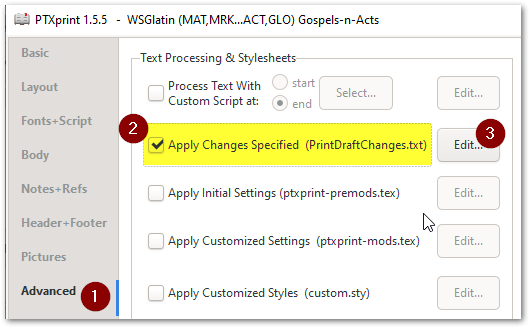
点击“编辑”(Edit)后,您可能会看到一个包含许多规则的文件,或者编辑器中可能只是一个空文件。
# A rule in this PrintDraftChange.txt file uses this syntax:
"Find what" > "Replace with"
因此,对于这项“去除重复标题”的任务,您需要添加一条正则表达式规则,看起来可能像这样:
"\\rem (.+?)\r?\n\\s \1\r?\n" > "\\s \1\r\n"
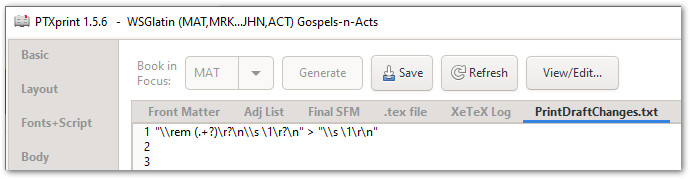
如果上面的内容不完全符合您的需求,请根据需要调整(例如,将 \rem 替换为您文本中使用的任何标记)。我强烈建议使用 regex101.com 这样的网站来完善您的表达式,并在数据的一小部分上测试您的查找和替换字符串,直到它正常工作为止。
希望这能帮到您,但如果您仍然遇到困难,请要求进一步澄清。
Thanks Dan for your good question. Welcome to the community!
There are many good reasons why we DON’T want people to be editing the USFM files manually during the layout/typesetting process, so the Viewer that shows you the “processed USFM” which gets fed into the typesetting program (XeTeX) is primarily there for diagnostic purposes. It shows the end result of all the pre-processing that has taken place due to the multitude of settings in the App.
HOWEVER, there is good news: There already is a mechanism to do exactly what you’re asking for by automating it completely through clever find and replace rules (called Regular Expressions, or RegEx). On the advanced tab is an option to enable PrintDraftChanges.txt to be applied to the text.
Once you’ve clicked on Edit, you might see a file with a bunch of rules in it, or there may just be an empty file in the editor.
# A rule in this PrintDraftChange.txt file uses this syntax:
"Find what" > "Replace with"
So for this “strip out the duplicate headings” task, you’ll need to add a RegEx rule which will look something like this:
"\\rem (.+?)\r?\n\\s \1\r?\n" > "\\s \1\r\n"
If what I have above doesn’t quite match your needs, then adjust it as needed (for example replace \rem with whatever marker you have in your text). I highly recommend using a site like regex101.com to refine your expression, and test out your Find and Substitution strings on a small subset of your data until it works.
I hope this helps, but if you’re still stranded, please ask for further clarification.
机器翻译自 English








