如果您渴望测试新功能,您可能想要下载今天早些时候发布的 PTXprint 最新版本。1.5 版本的错误修复和改进包括:
-
字体选择和设置已完全重新设计,以实现更大的灵活性
- 花边边框现在对装饰的位置和缩放有更多控制
- 多项用户界面改进,以及样式编辑器中更多的灵活性
- 现在可以从DBL 捆绑包进行打印(经过最少测试,工作进行中)
就在圣诞节前夕……
-
现在可以实现逐词对照文本(和/或 Ruby 注释)(用于早期测试和反馈)
为了使这正常工作,您需要执行以下操作:
-
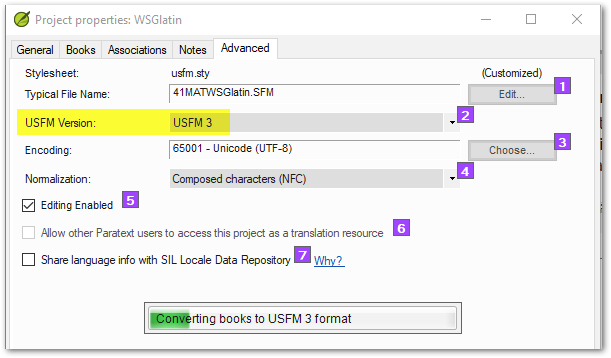
将您的 Paratext 项目切换为使用 USFM3 标记
-
对经文文本进行逐词对照/注释,并确保经文已批准
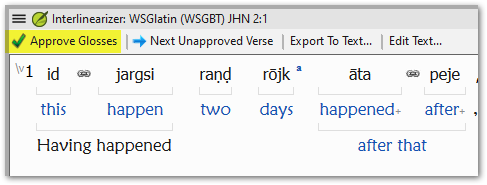
(以便所有已批准的注释以黑色显示):
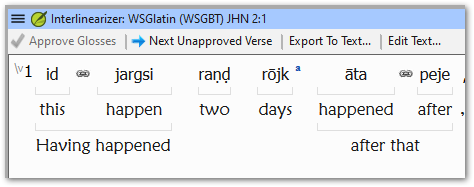
-
然后在高级选项卡中,您需要勾选逐词对照选项,以及语言标签(例如,英语为 'en',或者您的注释所使用的任何语言)。
-
使用样式编辑器调整\rb和gloss|rb样式,以更改逐词对照行的大小和颜色:
然后,您应该能够从 PTXprint 生成逐词对照文本输出,看起来像这样:
我们知道有一些未解决的问题将在明年得到解决。其中一个问题是双语文本和逐词对照文本目前还不能同时工作。但我们希望很快能修复这个问题。
If you are eager to test out new features, you may want to download the latest version of PTXprint released earlier today. Bug Fixes and Improvements in 1.5 include:
-
Font selection and setup has been completely re-worked to enable more flexibility
- Fancy Borders now has a lot more control over placement and scaling of decorations
- Several UI improvements, and more flexibility in Style Editor
- Printing is now possible from a DBL bundle (minimally tested, work in progress)
And just in time for Christmas…
-
Interlinear Text (and/or Ruby glossing) is now possible (for early testing and feedback)
In order to make this work well, you will need to do the following:
-
Switch your Paratext project to use USFM3 markup
-
Interlinearize/gloss the scripture text and ensure that the verses are approved
(so that all the approved glosses show in black):
-
Then on the Advanced tab, you will need to check the Interlinear option, and the language tag (e.g. ‘en’ for English, or whatever language your gloss is using).
-
Adjust the \rb and gloss|rb styles using the Style editor to change the size and color of the interlinear lines:
You should then be able to generate interlinear text output from PTXprint which looks something like this:
We are aware of a few outstanding issues which will be addressed next year. One of those issues is that Diglots and Interlinear text don’t yet work at the same time. But we hope to fix that one soon.
机器翻译自 English








