很高興這個問題已解決。不過,有人能澄清一下這些具體是什麼資源嗎?當我下載/安裝資源時,我在 Paratext 的列表中看不到 SDBG 或 SDBH 檔案。
我也做了一個小實驗……我關閉了 Paratext,將這兩個檔案(SDBx.mdv1z)移動到其他地方,然後重新開啟 Paratext。它給了我這個訊息:
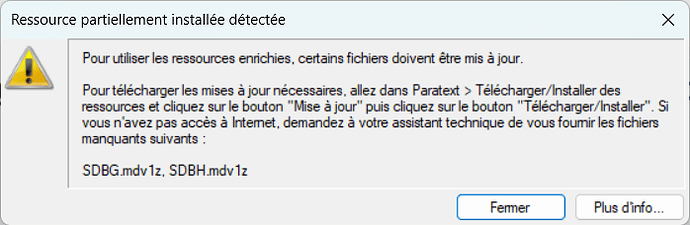
圖片698×228 60.7 KB
對於不懂法文的人來說……  它說在我獲取這兩個檔案之前無法使用增強型資源,並告訴我前往「下載/安裝」來獲取它們,點擊「更新」按鈕以獲取所有更新。(此時增強型資源視窗會顯示錯誤,並且不會顯示任何內容。)
我按照這些說明操作,但發現使用者介面有點笨拙。那兩項,即語義字典之類的,甚至不在列表中。最初,沒有選中任何項目,且「下載/安裝」按鈕處於非活動狀態。但所有增強型資源都顯示「更新」。如果我勾選列表中的任何項目(即使我沒有勾選任何增強型資源),它也會下載那兩個語義字典。然後,如果我重新啟動 Paratext,我的增強型資源就會再次正常工作。
因此,Paratext 似乎在使用「下載/安裝資源」對話框來下載那些如果缺失則隱藏的內容。這看起來有點奇怪。我假設這些檔案通常會隨 Paratext 更新而安裝/更新,但如果它們以某種方式丟失,這就是一種恢復它們的機制。
我認為,如果這些檔案缺失或需要更新,更好的做法是暫時將它們添加到可下載的項目列表中(並且不要將所有增強型資源都標記為有「更新」)。這樣使用者才能真正看到 Paratext 打算下載什麼以及它們有多大。
@John+Wickberg 「下載/安裝資源」對話框已經有「圖片和地圖」來支援增強型資源。將語義字典做成類似的事情不是更好嗎?讓它們顯示在可安裝和更新的項目列表中。這樣 Paratext 就不會下載您未預期的資源。也許您希望(例外地)不允許移除/卸載該資源,也許如上所述,它們只在缺失或有更新時才顯示在列表中。總之,這是一些供思考的點子。
That’s great that this has been solved. Can someone clarify, however, what resources those are exactly? When I download/install resources, I don’t see an SDBG or SDBH file in the list in Paratext.
I also tried a little experiment… I closed Paratext and moved those two files (SDBx.mdv1z) to a different place, then opened Paratext. It gave me this message:
image698×228 60.7 KB
For those that don’t speak French… It says I can’t use Enhanced Resources until I get these two files, and tells me to go to Download/Install to get them, clicking on the “Update” button to get all updates. (The enhanced resource window shows up with an error at this point, and doesn’t display anything.)
I followed these instructions, but found the User Interface to be a bit clunky. Those two items, the Semantic Dictionary something, are not even on the list. Initially, no items are selected, and the Download/Install button is not active. But all of the enhanced resources say “Update”. If I check anything on the list, (even if I didn’t check any of the enhanced resources,) it will download those two Semantic dictionaries. Then, if I restart Paratext, my enhanced resources will work again.
So Paratext seems to be using the Download/Install resource dialog to download things that are hidden if they are missing. That seems a little weird. I assume those files would normally be installed/updated with Paratext updates, but if somehow they go missing, this is a mechanism to get them back.
I would think it would be better, if those files are missing or need an update, to temporarily add them to the list of things that you can download (and NOT mark all of the enhanced resources as having an “Update”). Then the user can actually see what Paratext is intending to download and how big they are.
@John+Wickberg The Download/Install Resources dialog already has “Images and maps” to support the enhanced resources. Wouldn’t it be better to make the Semantic Dictionaries the same sort of thing, where they show up in the list of items that can be installed and updated? Then Paratext won’t be downloading resources that you aren’t expecting. Maybe you would want (exceptionally) to not be able to Remove/Uninstall that resource, and maybe as mentioned above they would only show up in the list when they are missing or there is an update. Anyway, some food for thought.
機器翻譯自 English








