我試圖使用自訂工具「Insert crossreferences or footnotes」將一組圖片表達式(\fig … \fig*)插入專案中。就我所見,清單的格式是正確的:
\ref MAT 2:2
\fig Caption|alt=“Description” src=“filename.tif” size=“col” ref=“2:1-2”\fig*
等等。
該檔案已儲存為專案資料夾中的 checktext.txt。然而,當我嘗試執行 Insert 工具時,出現錯誤訊息:
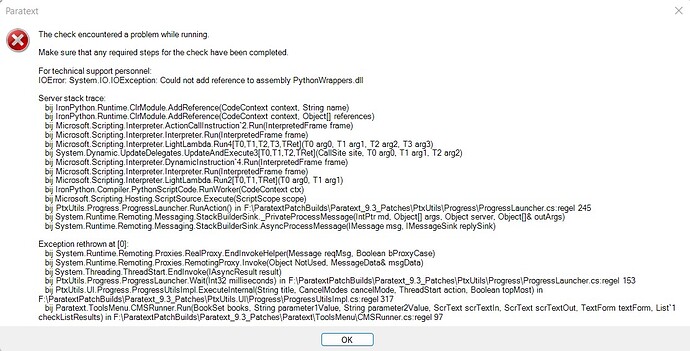
錯誤訊息1112×566 192 KB
我懷疑 checktext.txt 檔案是否有問題,因此我手動在專案中放置了一個圖片引用,並嘗試執行「Extract expression」以建立格式正確的 checktext.txt 檔案。然而,我得到了相同的錯誤訊息。
這個「Unsupported」工具是否已過時?如果是,是否有更好的方法可以批量將圖片插入專案中?
Paulus+Kieviet
I am trying to insert a set of figure expressions (\fig … \fig*) into a project using the custom tool “Insert crossreferences or footnotes”. As far as I can see, the list is formatted correctly:
\ref MAT 2:2
\fig Caption|alt=“Description” src=“filename.tif” size=“col” ref=“2:1-2”\fig*
etc.
The file is saved as checktext.txt in the project folder. However, when I try to run the Insert tool, it gives an error message:
Error message1112×566 192 KB
I wondered if something was wrong in the checktext.txt file, so I placed one figure ref. in the project manually and tried to run “Extract expression” to create a correctly formatted checktext.txt file. However, I got the same error message.
Has this “Unsupported” tool become obsolete? And if so, is there a better way to bulk insert figures into the project?
Paulus+Kieviet
機器翻譯自 English








