0
550 次浏览

How do I increase (or change) the font size in the focus text in the Biblical Terms text window? Control-+ doesn’t work, and the language settings for the project are not applied (see left-hand column GNTUK in screen capture):

较早的帖子 - 以原始语言显示
Paratext (157 分) 发布
已重新显示 | 550 次浏览

4 个回答

0
最佳答案

I am surprised that you could not control the font size of the comparative texts in the Biblical terms tool by adjusting the language properties of the resources in question. I just tried it again and it works. I did have to restart the Biblical terms tool. If I adjusted the language settings of the NIV in Portuguese for example, while the Biblical terms tool was already open (and NVI-P was a comparative text), nothing happened. But if I closed and reopened the Biblical terms tool then the tool used the new language settings for Portuguese.
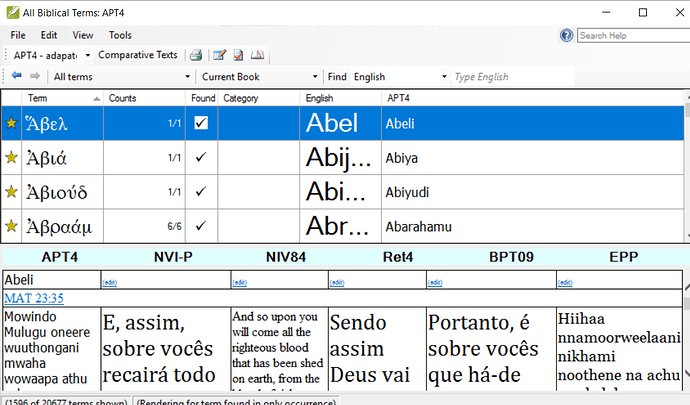
In this screenshot the NVI-P. RET4 and BPT09 all are using the Portuguese language settings which I have set at 18 point.


较早的帖子 - 以原始语言显示
[Expert]
(2.9k 分) 发布

The question would be, can you change the settings of the left-most text, APT4?
Maybe my problem has to do with the project GNTUK (not the resource, but an editable one). I’m able to adjust the size of the comparative texts through the settings, but not the lef-most text–the active working text. I have it set to Arial 14 in Paratext, but in BT it shows as a serifed font at about 10pt. No problem with changing the top part of BT through the BT settings.

较早的帖子 - 以原始语言显示
0

In the Biblical terms tool, go to the View menu then Select Biblical Terms Display settings. The different lines in the tool are expressed as percentages. Adjust the percentages to make the different parts of the tool larger or smaller. If you want to adjust the size of the comparative texts along the bottom, then open that text and and adjust the language settings for that project or resources.

较早的帖子 - 以原始语言显示
[Expert]
(2.9k 分) 发布

In addition to anon044949’s suggestion of changing the font size of the project, you can use an “unsupported feature” (i.e. something that works, but not because it was meant to work :confused:) and hold down Ctrl and scroll the mouse wheel over the text. It will zoom the whole pane, but it will not be remembered so you’ll have to redo it each time you open the Biblical Terms tool.

较早的帖子 - 以原始语言显示
0

Thanks, anon291708, for this solution. Unfortunately, none of anon044949’s suggestions affect the text in focus among the comparative texts. So Ctrl-scroll it will be.

较早的帖子 - 以原始语言显示
(157 分) 发布
0

Changing the font size under Project > Language Settings… > Font changes the font size of the left-most text in my Biblical Terms window both in PT 7.5.100.82 and PT 8.0.75.1.

较早的帖子 - 以原始语言显示
(346 分) 发布

相关问题

0
3 个回答 489 次浏览
我正在接受关于如何使用“Biblical Terms Renderings”(圣经术语译法)窗口的培训,但该窗口的一部分变灰了,我无法进行任何操作。有人有想法吗?
anon338354 136 发布 提问于 七月 27, 2022
0
1 个回答 320 次浏览
另一位用户刚刚问我如何在 Parallel Passages 中增大字体大小 对于该项目,字体设置为 Times New Roman 12 该项目在主 PT 窗口和 Biblical Terms 中使用 Times 字体 ... 有人知道为什么该资源在 Parallel Passages 中没有显示为 Times 12 吗? Paulus+Kieviet
Paulus Kieviet 517 发布 提问于 十月 3, 2022
0
3 个回答 486 次浏览
希望能调整菜单的字体大小。字体太小了,在我的外接屏幕上几乎看不清。请问这可行吗? 此致, anon647698
anon647698 114 发布 提问于 二月 10, 2021
0
4 个回答 418 次浏览
选项中的字体大小设置既不影响词汇表,也不影响圣经术语面板。在 Android 上仍然可以使用,但这一限制使得这两个功能在 macOS 安装版本上无法使用。字体小得几乎看不见。
reddirt 115 发布 提问于 五月 1, 2022
0
1 个回答 192 次浏览
I see that in printdraft the footnotes are a little smaller than the Bible fonts. Any way I can make them the same size as the Bible fonts?
anon261997 124 发布 提问于 十月 16, 2017
Welcome to Support Bible, where you can ask questions and receive answers from other members of the community.
For where two or three gather in my name, there am I with them.
Matthew 18:20
3,045 个问题
6,005 个回答
5,671 条评论
2,026 位用户





