0 votes
550 vues

How do I increase (or change) the font size in the focus text in the Biblical Terms text window? Control-+ doesn’t work, and the language settings for the project are not applied (see left-hand column GNTUK in screen capture):

Ancienne publication - affichée dans sa langue d'origine
Paratext par (157 points)
réaffiché | 550 vues

4 Réponses

0 votes
Meilleure réponse

I am surprised that you could not control the font size of the comparative texts in the Biblical terms tool by adjusting the language properties of the resources in question. I just tried it again and it works. I did have to restart the Biblical terms tool. If I adjusted the language settings of the NIV in Portuguese for example, while the Biblical terms tool was already open (and NVI-P was a comparative text), nothing happened. But if I closed and reopened the Biblical terms tool then the tool used the new language settings for Portuguese.
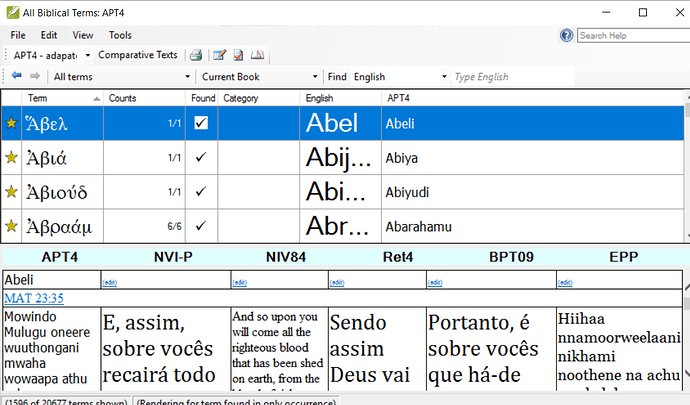
In this screenshot the NVI-P. RET4 and BPT09 all are using the Portuguese language settings which I have set at 18 point.


Ancienne publication - affichée dans sa langue d'origine
par [Expert]
(2,9k points)

The question would be, can you change the settings of the left-most text, APT4?
Maybe my problem has to do with the project GNTUK (not the resource, but an editable one). I’m able to adjust the size of the comparative texts through the settings, but not the lef-most text–the active working text. I have it set to Arial 14 in Paratext, but in BT it shows as a serifed font at about 10pt. No problem with changing the top part of BT through the BT settings.

Ancienne publication - affichée dans sa langue d'origine
0 votes

In the Biblical terms tool, go to the View menu then Select Biblical Terms Display settings. The different lines in the tool are expressed as percentages. Adjust the percentages to make the different parts of the tool larger or smaller. If you want to adjust the size of the comparative texts along the bottom, then open that text and and adjust the language settings for that project or resources.

Ancienne publication - affichée dans sa langue d'origine
par [Expert]
(2,9k points)

In addition to anon044949’s suggestion of changing the font size of the project, you can use an “unsupported feature” (i.e. something that works, but not because it was meant to work :confused:) and hold down Ctrl and scroll the mouse wheel over the text. It will zoom the whole pane, but it will not be remembered so you’ll have to redo it each time you open the Biblical Terms tool.

Ancienne publication - affichée dans sa langue d'origine
0 votes

Thanks, anon291708, for this solution. Unfortunately, none of anon044949’s suggestions affect the text in focus among the comparative texts. So Ctrl-scroll it will be.

Ancienne publication - affichée dans sa langue d'origine
par (157 points)
0 votes

Changing the font size under Project > Language Settings… > Font changes the font size of the left-most text in my Biblical Terms window both in PT 7.5.100.82 and PT 8.0.75.1.

Ancienne publication - affichée dans sa langue d'origine
par (346 points)

Questions connexes

0 votes
3 réponses 489 vues
Je suis en train de suivre la formation sur l'utilisation de la fenêtre des rendus des termes bibliques, une partie de la ... peux rien faire avec. Quelqu'un a-t-il des idées ?
anon338354 136 posée juil. 27, 2022
0 votes
1 réponse 320 vues
Un autre utilisateur vient de me demander comment augmenter la taille de police dans Parallel Passages. Pour le ... affichée en Times 12 dans Parallel Passages ? Paulus+Kieviet
Paulus Kieviet 517 posée oct. 3, 2022
0 votes
3 réponses 486 vues
Je serais reconnaissant de pouvoir ajuster la taille de la police du menu. La taille de la police est si ... sur mon écran externe. Est-ce possible ? Cordialement, anon647698
anon647698 114 posée févr. 10, 2021
0 votes
4 réponses 418 vues
Les paramètres de taille de police dans les options n'affectent ni le panneau de la liste de mots ni celui ... inutilisables sur l'installation macOS. La police est microscopique.
reddirt 115 posée mai 1, 2022
0 votes
1 réponse 192 vues
I see that in printdraft the footnotes are a little smaller than the Bible fonts. Any way I can make them the same size as the Bible fonts?
anon261997 124 posée oct. 16, 2017
Welcome to Support Bible, where you can ask questions and receive answers from other members of the community.
So Peter was kept in prison, but the church was earnestly praying to God for him.
Acts 12:5
3,045 questions
6,005 réponses
5,671 commentaires
2,026 utilisateurs





