0 votos
551 visualizações

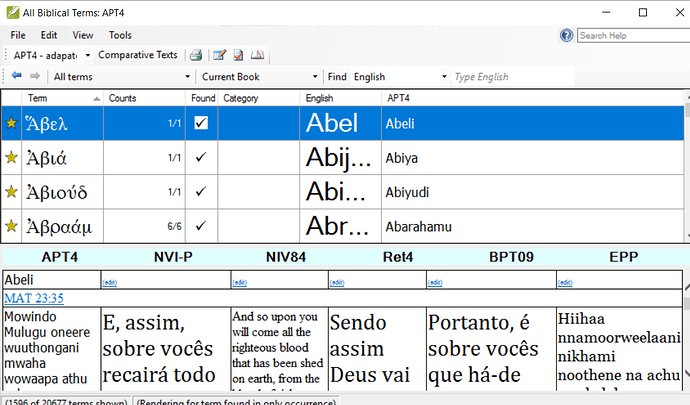
How do I increase (or change) the font size in the focus text in the Biblical Terms text window? Control-+ doesn’t work, and the language settings for the project are not applied (see left-hand column GNTUK in screen capture):

Publicação antiga - exibida no idioma original
Paratext por (157 pontos)
reexibida | 551 visualizações

4 Respostas

0 votos
Melhor resposta

I am surprised that you could not control the font size of the comparative texts in the Biblical terms tool by adjusting the language properties of the resources in question. I just tried it again and it works. I did have to restart the Biblical terms tool. If I adjusted the language settings of the NIV in Portuguese for example, while the Biblical terms tool was already open (and NVI-P was a comparative text), nothing happened. But if I closed and reopened the Biblical terms tool then the tool used the new language settings for Portuguese.
In this screenshot the NVI-P. RET4 and BPT09 all are using the Portuguese language settings which I have set at 18 point.


Publicação antiga - exibida no idioma original
por [Expert]
(2,9k pontos)

The question would be, can you change the settings of the left-most text, APT4?
Maybe my problem has to do with the project GNTUK (not the resource, but an editable one). I’m able to adjust the size of the comparative texts through the settings, but not the lef-most text–the active working text. I have it set to Arial 14 in Paratext, but in BT it shows as a serifed font at about 10pt. No problem with changing the top part of BT through the BT settings.

Publicação antiga - exibida no idioma original
0 votos

In the Biblical terms tool, go to the View menu then Select Biblical Terms Display settings. The different lines in the tool are expressed as percentages. Adjust the percentages to make the different parts of the tool larger or smaller. If you want to adjust the size of the comparative texts along the bottom, then open that text and and adjust the language settings for that project or resources.

Publicação antiga - exibida no idioma original
por [Expert]
(2,9k pontos)

In addition to anon044949’s suggestion of changing the font size of the project, you can use an “unsupported feature” (i.e. something that works, but not because it was meant to work :confused:) and hold down Ctrl and scroll the mouse wheel over the text. It will zoom the whole pane, but it will not be remembered so you’ll have to redo it each time you open the Biblical Terms tool.

Publicação antiga - exibida no idioma original
0 votos

Thanks, anon291708, for this solution. Unfortunately, none of anon044949’s suggestions affect the text in focus among the comparative texts. So Ctrl-scroll it will be.

Publicação antiga - exibida no idioma original
por (157 pontos)
0 votos

Changing the font size under Project > Language Settings… > Font changes the font size of the left-most text in my Biblical Terms window both in PT 7.5.100.82 and PT 8.0.75.1.

Publicação antiga - exibida no idioma original
por (346 pontos)

Perguntas relacionadas

0 votos
3 respostas 489 visualizações
Estou passando pelo treinamento para usar a janela de renderizações de termos bíblicos, mas parte da janela está cinza e não consigo fazer nada com ela. Alguém tem alguma ideia?
anon338354 136 perguntada Jul 27, 2022
0 votos
1 resposta 320 visualizações
Outro usuário acabou de me perguntar como aumentar o tamanho da fonte em Parallel Passages. No projeto em questão, as ... é exibido em Times 12 em Parallel Passages? Paulus+Kieviet
Paulus Kieviet 517 perguntada Out 3, 2022
0 votos
3 respostas 486 visualizações
Gostaria de poder ajustar o tamanho da fonte do menu. O tamanho da fonte é tão pequeno que ficou quase ilegível na minha tela externa. Isso é possível? Saudações, anon647698
anon647698 114 perguntada Fev 10, 2021
0 votos
4 respostas 418 visualizações
As configurações de tamanho da fonte nas opções não afetam nem o painel da lista de palavras nem o de ... recursos inutilizáveis na instalação para macOS. A fonte é minúscula
reddirt 115 perguntada Mai 1, 2022
0 votos
1 resposta 192 visualizações
I see that in printdraft the footnotes are a little smaller than the Bible fonts. Any way I can make them the same size as the Bible fonts?
anon261997 124 perguntada Out 16, 2017
Welcome to Support Bible, where you can ask questions and receive answers from other members of the community.
For where two or three gather in my name, there am I with them.
Matthew 18:20
3,045 perguntas
6,005 respostas
5,671 comentários
2,026 usuários





