0 votes
451 views

L.S.
In preparing a book for consultant checking the translation team anticipated working with consultant A and assigned many questions etc to this consultant. Alas, consultant A is not available and we will be working with consultant B instead. Is there a way to change all note assignments already assigned to consultant A to consultant B for just the one book we will be checking with consultant B?
Thanks for your help.
goodgoan.

Paratext by (347 points) | 451 views

4 Answers

0 votes
Best answer

Hello.
The assignment is a very useful visual aid, but it does not prevent another translator, consultant or administrator from answering, reassigning or resolving it.
(The assignment will show the note in red for the assigned user and in gray for the rest of the team).

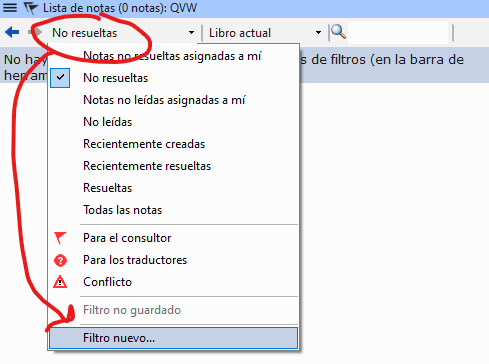
As recommended by @Iver+Larsen , the most practical thing to do is to filter the unresolved notes assigned to consultant A. For this you can order a filter that does just that, as in the following two images. And then change the book filter to the book you want to work with:
image

Then you will be able to see all the lists that were assigned to consultant A and work on them.

Saludos.

by (967 points)
0 votes

It was confirmed to me that bulk assignment changes are not possible. :sweat:

by (347 points)

If you are using the Assignment and Progress chart, can you not ask Consultant B to look at All Tasks rather than My Tasks? The consultant can respond to the notes, but may not be able to resolve them, unless you make him a temporary administrator. He can also filter the notes assigned to Consultant A.

0 votes

Thank you anon689242 and Iver+Larsen. This is a good work-around. It did not occur to me that others can also comment. Thanks a lot of sharing this.

by (347 points)
0 votes

I think you should be able to just open the file “My Paratext 9 Projects/[ProjectName]/Notes_Bart .xml” using a plain text editor and do a global replace on this field: . I’ve done things like that a lot before. Maybe a specialist can tell us if that’s no longer possible?

by (192 points)

Ah, that is a great tip AWR. And why did I not think of it ?
I see:
AssignedUser Consultant A slash AssignedUser
ReplyToUser Consultant A slash ReplyToUser

So I guess these both need to be changed. But not in the total xml file, just in the area that has the books we are checking at the moment, towards the bottom of the file.

It is certainly possible to edit the notes file, but you would need to edit each notes file to make sure that the <AssignedUser>UserName</AssignedUser> is changed.

Yesterday, I already invested 45 minutes to do it manually. So all is fine, but good to know the xml files can be edited to do bulk changes of “assign to”.

Just be careful with it. It can cause problems if there’s a mistake. My mistake when I tried this: not using an xml editor.

Related questions

0 votes
1 answer 49 views
Is there a way to add and view notes in this platform, similar to how it's done in Paratext? I haven’t been able to find that functionality.
Shivaji 117 asked Apr 15, 2025
0 votes
1 answer 172 views
Is there a way to find out if PT consultant notes have been deleted for a chapter? If yes, can they be restored?
listentwice 1.2k asked Aug 13, 2024
0 votes
1 answer 187 views
How do we set the default view of Assignments & Progress to show All Tasks. I have multiple users who are constantly ... but other users always have it open up to My Tasks.
Ben Pehrson 280 asked May 7, 2019
0 votes
3 answers 483 views
Dear all I wanted to convert a Consultant Notes created using Standard Translation Project (Not Registered) to a ... Project Please help if you know the solution blessings binoy
binoy 327 asked May 22, 2020
0 votes
4 answers 384 views
A consultant in training needs practice writing notes, and it might be best if their initial efforts were only seen by ... added to the regular project with the multi' feature.
[Expert]
sewhite
3.3k
asked Jun 3, 2021
Welcome to Support Bible, where you can ask questions and receive answers from other members of the community.
Give proper recognition to those widows who are really in need.
1 Timothy 5:3
3,040 questions
5,996 answers
5,663 comments
2,022 users