您好。
指派功能是一個非常實用的視覺輔助工具,但它並不會阻止其他翻譯人員、顧問或管理員進行回覆、重新指派或解決註解。
(指派功能會將該註解顯示為指派給的用戶的紅色,而團隊其他成員則顯示為灰色。)
正如 @Iver+Larsen 建議的,最實際的做法是篩選指派給顧問 A 的未解決註解。為此,您可以建立一個專門執行此功能的篩選器,如下面兩張圖片所示。然後將書籍篩選器變更為您要處理的書籍:
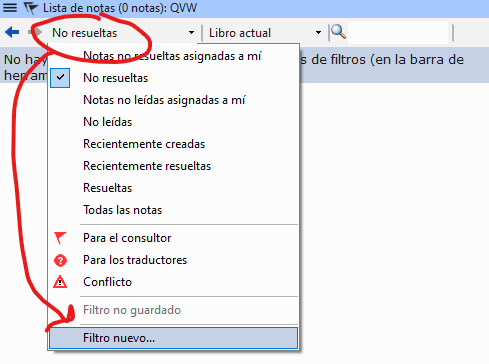
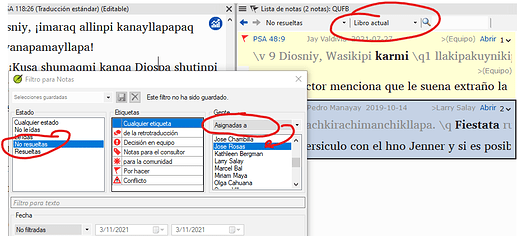
image923×422 51.1 KB
這樣您就可以看到所有指派給顧問 A 的清單並進行處理。
問候。
Hello.
The assignment is a very useful visual aid, but it does not prevent another translator, consultant or administrator from answering, reassigning or resolving it.
(The assignment will show the note in red for the assigned user and in gray for the rest of the team).
As recommended by @Iver+Larsen , the most practical thing to do is to filter the unresolved notes assigned to consultant A. For this you can order a filter that does just that, as in the following two images. And then change the book filter to the book you want to work with:
image923×422 51.1 KB
Then you will be able to see all the lists that were assigned to consultant A and work on them.
Saludos.
機器翻譯自 English








