Olá.
A atribuição é um recurso visual muito útil, mas não impede que outro tradutor, consultor ou administrador responda, reatribua ou resolva a nota.
(A atribuição mostrará a nota em vermelho para o usuário atribuído e em cinza para o restante da equipe).
Como recomendado por @Iver+Larsen , a coisa mais prática a fazer é filtrar as notas não resolvidas atribuídas ao consultor A. Para isso, você pode ordenar um filtro que faça exatamente isso, como nas duas imagens a seguir. E então altere o filtro do livro para o livro com o qual deseja trabalhar:
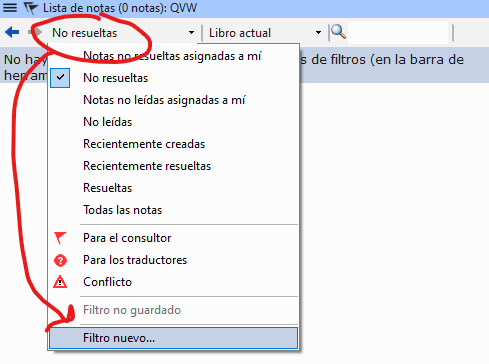
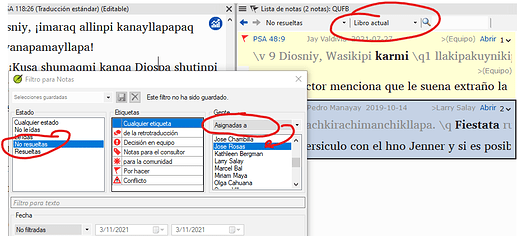
image923×422 51.1 KB
Então, você poderá ver todas as listas que foram atribuídas ao consultor A e trabalhar nelas.
Saludos.
Hello.
The assignment is a very useful visual aid, but it does not prevent another translator, consultant or administrator from answering, reassigning or resolving it.
(The assignment will show the note in red for the assigned user and in gray for the rest of the team).
As recommended by @Iver+Larsen , the most practical thing to do is to filter the unresolved notes assigned to consultant A. For this you can order a filter that does just that, as in the following two images. And then change the book filter to the book you want to work with:
image923×422 51.1 KB
Then you will be able to see all the lists that were assigned to consultant A and work on them.
Saludos.
Tradução automática de English








