Bonjour.
L'affectation est un outil visuel très utile, mais elle n'empêche pas un autre traducteur, consultant ou administrateur d'y répondre, de la réaffecter ou de la résoudre.
(L'affectation affichera la note en rouge pour l'utilisateur affecté et en gris pour le reste de l'équipe).
Comme recommandé par @Iver+Larsen, la chose la plus pratique à faire est de filtrer les notes non résolues affectées au consultant A. Pour cela, vous pouvez créer un filtre qui fait exactement cela, comme le montrent les deux images ci-dessous. Puis modifiez le filtre du livre pour le livre avec lequel vous souhaitez travailler :
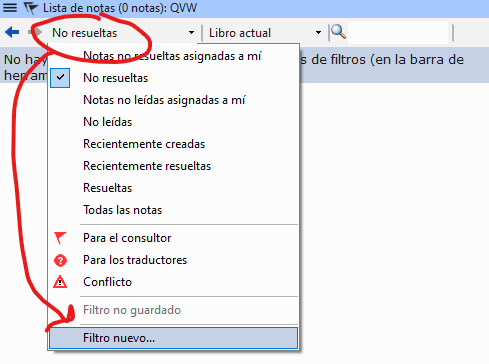
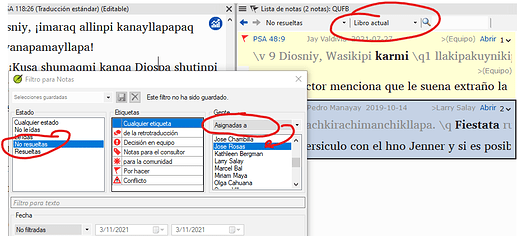
image923×422 51.1 KB
Vous pourrez alors voir toutes les listes qui ont été affectées au consultant A et y travailler.
Salutations.
Hello.
The assignment is a very useful visual aid, but it does not prevent another translator, consultant or administrator from answering, reassigning or resolving it.
(The assignment will show the note in red for the assigned user and in gray for the rest of the team).
As recommended by @Iver+Larsen , the most practical thing to do is to filter the unresolved notes assigned to consultant A. For this you can order a filter that does just that, as in the following two images. And then change the book filter to the book you want to work with:
image923×422 51.1 KB
Then you will be able to see all the lists that were assigned to consultant A and work on them.
Saludos.
Traduit automatiquement depuis English








