Hola.
La asignación es una ayuda visual muy útil, pero no impide que otro traductor, consultor o administrador responda, reasigne o resuelva la nota.
(El usuario asignado verá la nota en rojo y el resto del equipo la verá en gris).
Como recomendó @Iver+Larsen, lo más práctico es filtrar las notas sin resolver asignadas al consultor A. Para ello, pueden ordenar un filtro que haga exactamente eso, como en las siguientes dos imágenes. Y luego cambien el filtro de libro al libro con el que deseen trabajar:
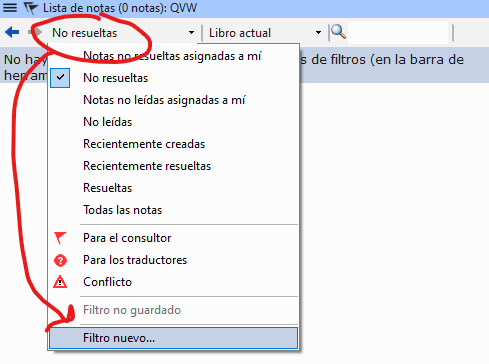
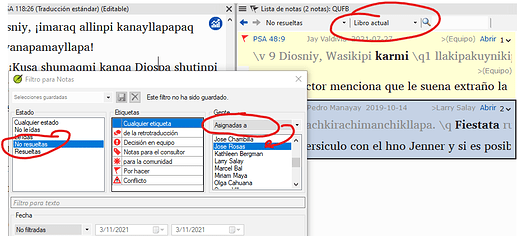
image923×422 51.1 KB
Entonces, podrán ver todas las listas que estaban asignadas al consultor A y trabajar en ellas.
Saludos.
Hello.
The assignment is a very useful visual aid, but it does not prevent another translator, consultant or administrator from answering, reassigning or resolving it.
(The assignment will show the note in red for the assigned user and in gray for the rest of the team).
As recommended by @Iver+Larsen , the most practical thing to do is to filter the unresolved notes assigned to consultant A. For this you can order a filter that does just that, as in the following two images. And then change the book filter to the book you want to work with:
image923×422 51.1 KB
Then you will be able to see all the lists that were assigned to consultant A and work on them.
Saludos.
Traducción automática desde English








