当你插入脚注时,默认情况下会插入脚注所在经节的 \fr。但是,如果你处理的是“遗留”脚注,它们可能位于其他经节(如你的例子所示)。这由“经文引用设置”(Scripture Reference Settings)> “源选项”(Origin Options)选项卡处理。在那里,你可以定义源(\fr 或 \xo)是否必须完全匹配,或者是其他组合。
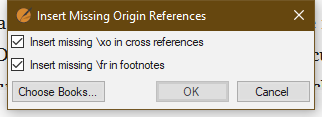
如果你的 \fr 或 \xo 有“缺失”的源,你可以使用“高级”(Advanced)> “插入缺失的源引用”(Insert Missing Origin References)工具来插入这些内容
需要注意的是,有时人们会在一个经节中输入注释,但希望它引用多个经节。如果你没有正确设置“源选项”(Origin Options)的选择,这将生成错误。
When you insert a footnote, by default the \fr is inserted for the verse where the footnote is added. However, if you are dealing with “legacy” footnotes they may be located in other verses (as your example). This is handled by the Scripture Reference Settings > Origin Options tab. There you can define if the origin (\fr or \xo) must match exactly or some other combination.
If you have “missing” origins for \fr or \xo you can insert these using the Advanced > Insert Missing Origin References tool
As a note, sometimes folks will enter a note in one verse, but want it to reference several verses. If you don’t set your selection of the Origin Options correctly this will generate errors.
机器翻译自 English








