Ketika Anda menyisipkan catatan kaki, secara default \fr disisipkan untuk ayat tempat catatan kaki ditambahkan. Namun, jika Anda berurusan dengan catatan kaki "legacy" (warisan), mereka mungkin terletak di ayat lain (seperti contoh Anda). Ini ditangani oleh Scripture Reference Settings > tab Origin Options. Di sana Anda dapat mendefinisikan apakah origin (\fr atau \xo) harus cocok persis atau kombinasi lainnya.
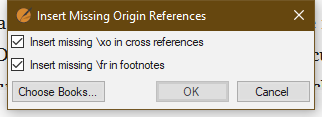
Jika Anda memiliki origin yang "hilang" untuk \fr atau \xo, Anda dapat menyisipkannya menggunakan alat Advanced > Insert Missing Origin References
Sebagai catatan, kadang-kadang orang akan memasukkan catatan di satu ayat, tetapi ingin merujuk ke beberapa ayat. Jika Anda tidak mengatur pilihan Origin Options dengan benar, ini akan menghasilkan error.
When you insert a footnote, by default the \fr is inserted for the verse where the footnote is added. However, if you are dealing with “legacy” footnotes they may be located in other verses (as your example). This is handled by the Scripture Reference Settings > Origin Options tab. There you can define if the origin (\fr or \xo) must match exactly or some other combination.
If you have “missing” origins for \fr or \xo you can insert these using the Advanced > Insert Missing Origin References tool
As a note, sometimes folks will enter a note in one verse, but want it to reference several verses. If you don’t set your selection of the Origin Options correctly this will generate errors.
Diterjemahkan secara otomatis dari English








