0
313 次瀏覽

In PT8 you could have a complicated windows layout and could temporarily increase a single project to fill the entire PT windows. When you reduced it, it would then go back to its original position in the layout. It used the middle icon in each of these pictures to increase and reduce, respectively:
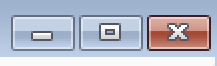
image image

I’ve independently had two different translators ask if they can do the same thing in PT9. While I can find workarounds–such as opening the project as a floating windows, increasing the size, then dragging it back onto it’s panel in the main layout–I haven’t found anything nearly as easy or intuitive as the PT8 way of doing things. Am I missing something, or has this functionality been lost in PT9?


舊文章 - 以原文顯示
Paratext (1.9k 點) 提出
已重新顯示 | 313 次瀏覽

1 個回答

0
最佳回答

Right click on the title bar of the window and choose Open as a floating window.
grafik
To get the window back into the Paratext main window, right click on the title bar again and choose Dock window.

舊文章 - 以原文顯示
(872 點) 提出

Yes, I had put that in my original message as a “workaround”, but I don’t see it as being as easy or intuitive as the PT8 method was. It requires more keystrokes, and when you re-dock the window it doesn’t go back to where it originally was in the layout.

舊文章 - 以原文顯示

In PT9 there is an “undo move” option on the Main Paratext menu (ctrl+shift+z). So, if you float your window and then use ctrl+shift+z it will restore it to where it was. The undo move will remember the list of actions and continue to undo previous actions.

舊文章 - 以原文顯示

Thanks anon848905. That’s not as easy to use as PT8, but it certainly is an improvement over drag-drop to getting it back into place. At least for me… I’m used to key command shortcuts. I’ll have to wait and see what the users who asked about this think of that undo move feature.

舊文章 - 以原文顯示

相關問題

0
3 個回答 555 次瀏覽
擁有顧問(consultant)角色的人,如果透過按住 Shift 鍵並點擊「專案」(Project)選單來暫時獲得管理員角色,是否可以變更專案中成員的角色?例如,該顧問能否將該專案現有的管理員(Administrator)角色變更為觀察者(Observer)角色?
anon212107 105 提出 已提問 2月 27, 2020
0
1 個回答 320 次瀏覽
另一位使用者剛問我如何在 Parallel Passages 中增加字型大小 就該專案而言,字型設定為 Times New Roman 12 該專案在主 PT 視窗和 Biblical terms 中使用 Times 字 ... 有人知道為什麼該資源在 Parallel Passages 中沒有以 Times 12 顯示嗎? Paulus+Kieviet
Paulus Kieviet 517 提出 已提問 10月 3, 2022
0
3 個回答 393 次瀏覽
The size of the Hebrew text in the lemma(s) column on the computer of one translator is just too small. Where can I change ... using Ctrl + scroll wheel, but that's not the same.
lichti 872 提出 已提問 10月 5, 2018
0
3 個回答 486 次瀏覽
如果能調整選單的字型大小,我會非常感激。目前的字型太小,在我的外接螢幕上幾乎無法閱讀。這有可能嗎? 問候, anon647698
anon647698 114 提出 已提問 2月 10, 2021
0
2 個回答 304 次瀏覽
Firstly, in this message: File or diffs not displayed: File is larger than the specified max size. maxdiff = 1024 KB ... warning? Can I change a setting so that it always displays?
wdavidhj 1.4k 提出 已提問 2月 8, 2019
Welcome to Support Bible, where you can ask questions and receive answers from other members of the community.
So Peter was kept in prison, but the church was earnestly praying to God for him.
Acts 12:5
3,046 個問題
6,005 個回答
5,671 則評論
2,026 位使用者