0 votos
716 visualizações

We are having difficulties in notes English font display. However, you see in the attachment, that notes English fonts appearing as boxes.

Both administrator’s computers and one translator are having this problem.

It displays correctly on some computers and wrong on some computers, but the language settings are identical and they are all doing send/receive with the same project.

I installed font in my laptop as an administrator(install for all users).

If I take same note text to other project it’s showing English properly and if I paste text to the Notepad++ or word it’s showing English text, not as boxes.

Changed project language font in Paratext 9, this time notes text showing boxes and markings started showing boxes. Attached screenshot will give clear idea.

My Paratext version: 9.0.100.83 window 10.0.18363 operating system.
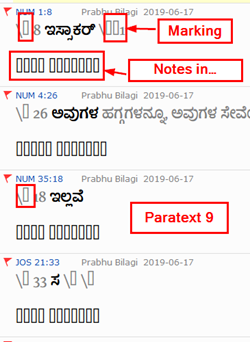
image

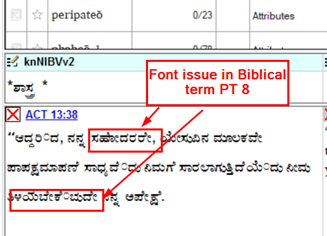
Same notes if I open in Paratext 8, English font display is correct, but vernacular language font display issue. Words joined improperly.

Bible text font is different and notes font is different
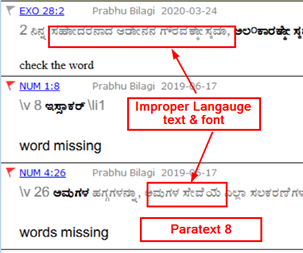
image

Paratext 8 Biblical Terms

image

Publicação antiga - exibida no idioma original
Paratext por (241 pontos) | 716 visualizações

3 Respostas

0 votos
Melhor resposta

The only other thing I can think of is that you do not have the font it’s falling back to on your machine. On my machine, Times New Roman is being used for that text because the normal font does not have the needed glyphs. Do you have the Times New Roman font installed?

EDIT: If that doesn’t help, please use Help > Give feedback so we can take a closer look at what is going on.

EDIT2: Also, it looks like those notes are marked as Kannada (kn) notes. Make sure the correct language is selected when creating a note. Does the note in EXO 28:2 look correct on your machine (it has the note language set to English (en))?

Publicação antiga - exibida no idioma original
por [Expert]
(16,7k pontos)

reexibida

Times New Roman font installed in my machine.

English font appearing as boxex in notes and Biblical term (PT 8) (PTXS-22357)

I will follow the instruction as you told while creating notes.
In notes even markings also showing boxex.

Publicação antiga - exibida no idioma original
0 votos

Since the font used by the project (Belur Kannada Regular) is not free, it’s going to be really hard to figure out what is going on. Is there a free font that has the same problems?

Publicação antiga - exibida no idioma original
por [Expert]
(16,7k pontos)

Thank you for your reply,
We tried Noto serif Kannada and Tunga font, same issue is there.

Publicação antiga - exibida no idioma original
0 votos

Could you try go to your Project > Project settings > Language settings > Font Features tab and clear the text in the Font language box so that it’s empty? Does that fix the problem?

Publicação antiga - exibida no idioma original
por [Expert]
(16,7k pontos)

reexibida

As per your instruction cleared the text in box, after restarting the PT same issue is there.
image

Publicação antiga - exibida no idioma original

Perguntas relacionadas

0 votos
2 respostas 279 visualizações
I just saw a case where the renderings in the project biblical terms list (for a text that is in a non-Roman ... be used for the renderings in the project biblical terms list.
jeffh 1,4k perguntada Out 19, 2017
0 votos
0 respostas 165 visualizações
We are having difficulties in parts of Paratext 8 with non-roman front rendering. The Karenni Unicode font we are ... KB Paratext 8 Conflicts Display Problem.jpg1298 866 178 KB
anon281504 144 perguntada Fev 22, 2018
0 votos
2 respostas 586 visualizações
Eu e minha equipe estamos atualmente revisando nosso rascunho de Êxodo, e, ao trabalhar em Êxodo 8, ... . Mas provavelmente também conseguiria descobrir pelo inglês. Obrigado!
anon242843 105 perguntada Jun 23, 2021
0 votos
3 respostas 701 visualizações
Am helping a user who pointed me out to this problem. In this example, when you search for the English term Messiah, you ... . Is there a setting we can change to make this work?
MSEAIT_LT 478 perguntada Out 25, 2018
0 votos
4 respostas 590 visualizações
How do I increase (or change) the font size in the focus text in the Biblical Terms text window? Control-+ doesn' ... column GNTUK in screen capture): Pasted image1916 306 21.7 KB
anon645204 157 perguntada Fev 3, 2017
Welcome to Support Bible, where you can ask questions and receive answers from other members of the community.
Just as a body, though one, has many parts, but all its many parts form one body, so it is with Christ.
1 Corinthians 12:12
3,049 perguntas
6,008 respostas
5,673 comentários
2,029 usuários