0
372 次浏览

When I hit the backspace key, it does not backspace where the cursor is, but jumps back to the place where the cursor was before. So the only way to correct a mispelling is to place the cursor before the mispelling and use the delete key. What is wrong? How to correct it?

较早的帖子 - 以原始语言显示
Paratext (105 分) 发布 | 372 次浏览

1 个回答

0
最佳答案

Dear anon746885 -
Thanks for using the supporter site. For a question like this it is helpful if you indicate what version of Paratext you are using and if you have any other information that might impact what you are seeing: Operating system, keyboarding programs, special scripts, etc. It would also be helpful to know what kind of text you are working with. One option would be to paste a sample of text to better describe what is happening:

Ut arin ma̱ ani nataꞌoc ru xya̱lal lin matcꞌ.

When I put the cursor to the right of “ru” and hit the backspace the cursor does… instead of deleting the “u”

较早的帖子 - 以原始语言显示
(9.9k 分) 发布

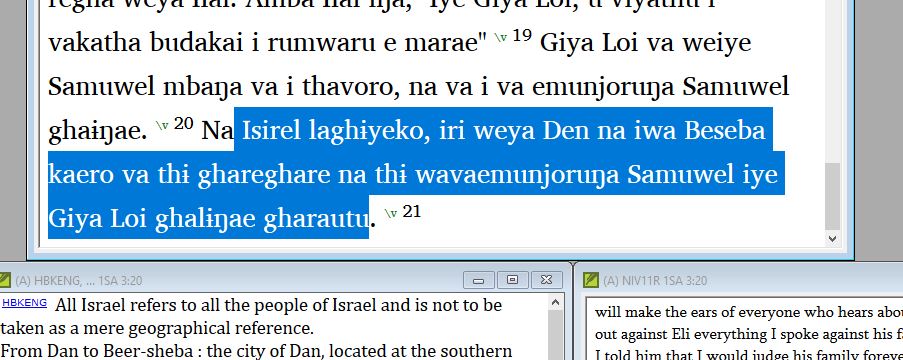
Thanks for responding. I have PT 8.0.100.4. I have a keyman desktop for two special characters, :i for barred ɨ and ;n for ŋ, and same for the capital letters. This on Dell Lat 7370 Windows 10. This occurs in both the Sudest text window and the English VE window. See attached clip for text. When I put the cursor at the end of the ‘iri’ and hit backspace, it removes the ‘i’, and then make the correction. I get further along and place the cursor at the end of the ‘wavaemunjoruŋa’, and then hit the backspace. The cursor jumps back and removes the ‘i’ at former correction on the ‘iri’. This means I have to go back, and sometimes that could be many verses back, to find what I uncorrected, do it right again, and then go back to where I started and use the delete key to make the correct. I have started to just use the delete key, but, of course, that is more work, and I don’t always just remember in time.

Does this info help at all?

anon746885
较早的帖子 - 以原始语言显示

That version of PT8 is almost 3 years old. There have been many bug fixes since then. Please update to the latest version (8.0.100.84) to see if that fixes your problem.

较早的帖子 - 以原始语言显示

Hi anon291708, I have tried updating PT8 but the system responds with the message to close the open PT8. When I do that, the message stays on the screen and refuses to achknowledge the closing, those I can’t find an open PY8 anywhere that I know to look. If I close the error message, then the Premature finish because of error screen comes up. What next, please??

anon746885

较早的帖子 - 以原始语言显示

Go to your windows task
manager Ctrl+Alt+Esc. Look thru the entire list to see if any
other Paratext 8 appears and end the task.

较早的帖子 - 以原始语言显示

Yes, the 32bit version was in background, but only visible on task manager. Shut it off and the update installed easily and quickly. Seems to have cured (for now at least) the original problem of the cursor going back to the previous correction. Thanks for the help. anon746885

image001.jpg

较早的帖子 - 以原始语言显示

相关问题

0
1 个回答 16 次浏览
我的同事也是管理员,并且拥有“项目中所有书卷”的权限。他添加了一条注释,还做了一处更正(在两个不同的章节中),但我两者都看不到。我们已经多次执行了 Send/Receive(发送/接收),并将“Project type”(项目类型)从“Test or Training”(测试或培训)更改为“Study Bible Additions”(研究圣经增补)。
anon180868 195 发布 提问于 十月 2, 2025
0
1 个回答 227 次浏览
一位新用户开始使用“拼写检查”工具。他进行了诸如 /na/ -> /i te/ 这样的“拼写更正”,这显然不是我们希望在词表中看到的更改……但现在 /na/ 的 21,000 多个实例都带有红色下划线。我该如何从词表中移除这类内容?我在“帮助”中找不到相关指导,所以如果您能提供任何建议,我将不胜感激!;-)
Paul 642 发布 提问于 三月 8, 2024
Paratext
0
2 个回答 264 次浏览
www.paratext.org 宕机了吗? 我在 Brave 或 Firefox 中都无法查看。我遇到了 404 错误。 谢谢
Fork 184 发布 提问于 八月 9, 2021
Paratext
0
1 个回答 226 次浏览
We've installed Paratext 8 and the program seemed to try to install the patch twice but there was no progress bar ... version 8.0.100.6 Any suggestions for applying the patch?
dcb 194 发布 提问于 五月 26, 2017
0
2 个回答 49 次浏览
有时我需要修改 AutoCorrect 文件(或创建一个新文件),但我不知道该如何操作。有没有简单的方法来编辑 AutoCorrect.txt 文件?下面有一个答案!
Phil_Leckrone 9.9k 发布 提问于 六月 4
Welcome to Support Bible, where you can ask questions and receive answers from other members of the community.
Just as a body, though one, has many parts, but all its many parts form one body, so it is with Christ.
1 Corinthians 12:12
3,045 个问题
6,005 个回答
5,671 条评论
2,026 位用户







