0 голосов
372 просмотров

When I hit the backspace key, it does not backspace where the cursor is, but jumps back to the place where the cursor was before. So the only way to correct a mispelling is to place the cursor before the mispelling and use the delete key. What is wrong? How to correct it?

Старое сообщение — показано на исходном языке
Paratext от (105 очков) | 372 просмотров

1 ответ

0 голосов
Лучший ответ

Dear anon746885 -
Thanks for using the supporter site. For a question like this it is helpful if you indicate what version of Paratext you are using and if you have any other information that might impact what you are seeing: Operating system, keyboarding programs, special scripts, etc. It would also be helpful to know what kind of text you are working with. One option would be to paste a sample of text to better describe what is happening:

Ut arin ma̱ ani nataꞌoc ru xya̱lal lin matcꞌ.

When I put the cursor to the right of “ru” and hit the backspace the cursor does… instead of deleting the “u”

Старое сообщение — показано на исходном языке
от (9,9тыс. очков)

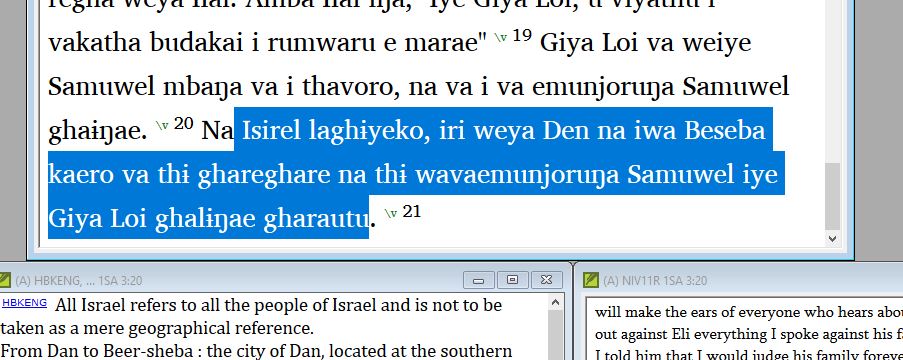
Thanks for responding. I have PT 8.0.100.4. I have a keyman desktop for two special characters, :i for barred ɨ and ;n for ŋ, and same for the capital letters. This on Dell Lat 7370 Windows 10. This occurs in both the Sudest text window and the English VE window. See attached clip for text. When I put the cursor at the end of the ‘iri’ and hit backspace, it removes the ‘i’, and then make the correction. I get further along and place the cursor at the end of the ‘wavaemunjoruŋa’, and then hit the backspace. The cursor jumps back and removes the ‘i’ at former correction on the ‘iri’. This means I have to go back, and sometimes that could be many verses back, to find what I uncorrected, do it right again, and then go back to where I started and use the delete key to make the correct. I have started to just use the delete key, but, of course, that is more work, and I don’t always just remember in time.

Does this info help at all?

anon746885
Старое сообщение — показано на исходном языке

That version of PT8 is almost 3 years old. There have been many bug fixes since then. Please update to the latest version (8.0.100.84) to see if that fixes your problem.

Старое сообщение — показано на исходном языке

Hi anon291708, I have tried updating PT8 but the system responds with the message to close the open PT8. When I do that, the message stays on the screen and refuses to achknowledge the closing, those I can’t find an open PY8 anywhere that I know to look. If I close the error message, then the Premature finish because of error screen comes up. What next, please??

anon746885

Старое сообщение — показано на исходном языке

Go to your windows task
manager Ctrl+Alt+Esc. Look thru the entire list to see if any
other Paratext 8 appears and end the task.

Старое сообщение — показано на исходном языке

Yes, the 32bit version was in background, but only visible on task manager. Shut it off and the update installed easily and quickly. Seems to have cured (for now at least) the original problem of the cursor going back to the previous correction. Thanks for the help. anon746885

image001.jpg

Старое сообщение — показано на исходном языке

Похожие вопросы

0 голосов
1 ответ 16 просмотров
Коллега, который также является администратором и имеет права на Все книги в проекте , добавил примечание и также внёс ... Тест или обучение на Дополнения к учебной Библии .
anon180868 195 задал вопрос окт 2, 2025
0 голосов
1 ответ 227 просмотров
Новый пользователь начинает использовать инструмент проверка орфографии . Он внёс исправления орфографии , например /na/ -> ... , поэтому буду благодарен за любую помощь! ;-)
Paul 642 задал вопрос мар 8, 2024
0 голосов
2 ответов 264 просмотров
Не работает www.paratext.org? Я не могу открыть его в Brave или Firefox. Получаю ошибку 404. Спасибо
Fork 184 задал вопрос авг 9, 2021
0 голосов
1 ответ 226 просмотров
We've installed Paratext 8 and the program seemed to try to install the patch twice but there was no progress bar ... version 8.0.100.6 Any suggestions for applying the patch?
dcb 194 задал вопрос май 26, 2017
0 голосов
2 ответов 49 просмотров
Иногда мне нужно внести изменения в файл AutoCorrect (или создать его), и я не знаю, как это сделать. ... отредактировать файл AutoCorrect.txt? Один из ответов приведен ниже!
Phil_Leckrone 9,9тыс. задал вопрос июн 4
Welcome to Support Bible, where you can ask questions and receive answers from other members of the community.
Every day they continued to meet together in the temple courts. They broke bread in their homes and ate together with glad and sincere hearts, praising God and enjoying the favor of all the people. And the Lord added to their number daily those who were being saved.
Acts 2:46-47
3,045 вопросов
6,005 ответов
5,671 комментариев
2,026 пользователей







