0 votos
373 visualizações

When I hit the backspace key, it does not backspace where the cursor is, but jumps back to the place where the cursor was before. So the only way to correct a mispelling is to place the cursor before the mispelling and use the delete key. What is wrong? How to correct it?

Publicação antiga - exibida no idioma original
Paratext por (105 pontos) | 373 visualizações

1 Resposta

0 votos
Melhor resposta

Dear anon746885 -
Thanks for using the supporter site. For a question like this it is helpful if you indicate what version of Paratext you are using and if you have any other information that might impact what you are seeing: Operating system, keyboarding programs, special scripts, etc. It would also be helpful to know what kind of text you are working with. One option would be to paste a sample of text to better describe what is happening:

Ut arin ma̱ ani nataꞌoc ru xya̱lal lin matcꞌ.

When I put the cursor to the right of “ru” and hit the backspace the cursor does… instead of deleting the “u”

Publicação antiga - exibida no idioma original
por (9,9k pontos)

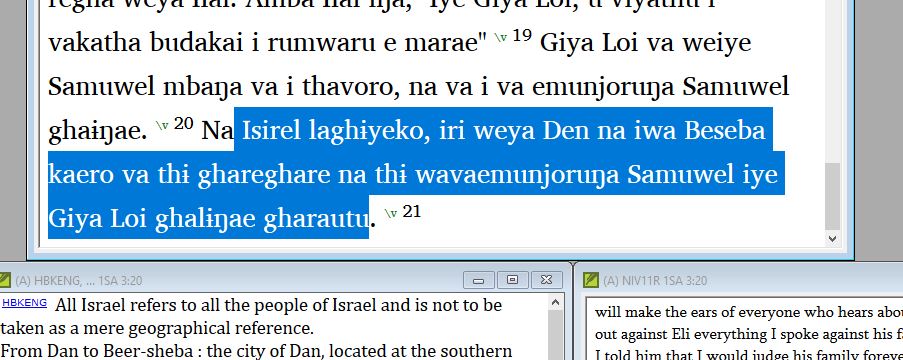
Thanks for responding. I have PT 8.0.100.4. I have a keyman desktop for two special characters, :i for barred ɨ and ;n for ŋ, and same for the capital letters. This on Dell Lat 7370 Windows 10. This occurs in both the Sudest text window and the English VE window. See attached clip for text. When I put the cursor at the end of the ‘iri’ and hit backspace, it removes the ‘i’, and then make the correction. I get further along and place the cursor at the end of the ‘wavaemunjoruŋa’, and then hit the backspace. The cursor jumps back and removes the ‘i’ at former correction on the ‘iri’. This means I have to go back, and sometimes that could be many verses back, to find what I uncorrected, do it right again, and then go back to where I started and use the delete key to make the correct. I have started to just use the delete key, but, of course, that is more work, and I don’t always just remember in time.

Does this info help at all?

anon746885
Publicação antiga - exibida no idioma original

That version of PT8 is almost 3 years old. There have been many bug fixes since then. Please update to the latest version (8.0.100.84) to see if that fixes your problem.

Publicação antiga - exibida no idioma original

Hi anon291708, I have tried updating PT8 but the system responds with the message to close the open PT8. When I do that, the message stays on the screen and refuses to achknowledge the closing, those I can’t find an open PY8 anywhere that I know to look. If I close the error message, then the Premature finish because of error screen comes up. What next, please??

anon746885

Publicação antiga - exibida no idioma original

Go to your windows task
manager Ctrl+Alt+Esc. Look thru the entire list to see if any
other Paratext 8 appears and end the task.

Publicação antiga - exibida no idioma original

Yes, the 32bit version was in background, but only visible on task manager. Shut it off and the update installed easily and quickly. Seems to have cured (for now at least) the original problem of the cursor going back to the previous correction. Thanks for the help. anon746885

image001.jpg

Publicação antiga - exibida no idioma original

Perguntas relacionadas

0 votos
1 resposta 16 visualizações
Um colega, que também é Administrador e tem permissões para "Todos os livros do projeto", adicionou uma nota e também fez ... " de "Test or Training" para "Study Bible Additions".
anon180868 195 perguntada Out 2, 2025
0 votos
1 resposta 227 visualizações
Um novo usuário está começando a usar a ferramenta de 'verificação ortográfica'. Ele fez "correções ortográficas" como ... obrigado por qualquer ajuda que possam fornecer! ;-)
Paul 642 perguntada Mar 8, 2024
0 votos
2 respostas 264 visualizações
O www.paratext.org está fora do ar? Não consigo visualizá-lo no Brave nem no Firefox. Recebo um erro 404. Obrigado
Fork 184 perguntada Ago 9, 2021
0 votos
1 resposta 226 visualizações
We've installed Paratext 8 and the program seemed to try to install the patch twice but there was no progress bar ... version 8.0.100.6 Any suggestions for applying the patch?
dcb 194 perguntada Mai 26, 2017
0 votos
2 respostas 49 visualizações
Às vezes, preciso fazer alterações no arquivo AutoCorrect (ou criar um) e não sei como fazer isso. Existe uma ... de editar o arquivo AutoCorrect.txt? Uma resposta está abaixo!
Phil_Leckrone 9,9k perguntada Jun 4
Welcome to Support Bible, where you can ask questions and receive answers from other members of the community.
And let us consider how we may spur one another on toward love and good deeds, not giving up meeting together, as some are in the habit of doing, but encouraging one another—and all the more as you see the Day approaching.
Hebrews 10:24-25
3,045 perguntas
6,005 respostas
5,671 comentários
2,026 usuários







