0
389 次浏览

Hi, I want to take only introduction part as a pdf of each book in one shot. I tried in the option export pdf in which combine book and one book option is there. Otherwise we have to take each introduction part separately. Please suggest me.

Thank you and Regards
Prabhu_beelagi

较早的帖子 - 以原始语言显示
Paratext (241 分) 发布
已重新显示 | 389 次浏览

2 个回答

0
最佳答案

I’m not sure there is an easy way to do what you’re asking, but I’m currently developing an “enhanced PrintDraft tool” which will make it easy to do what you need (by just checking one option):
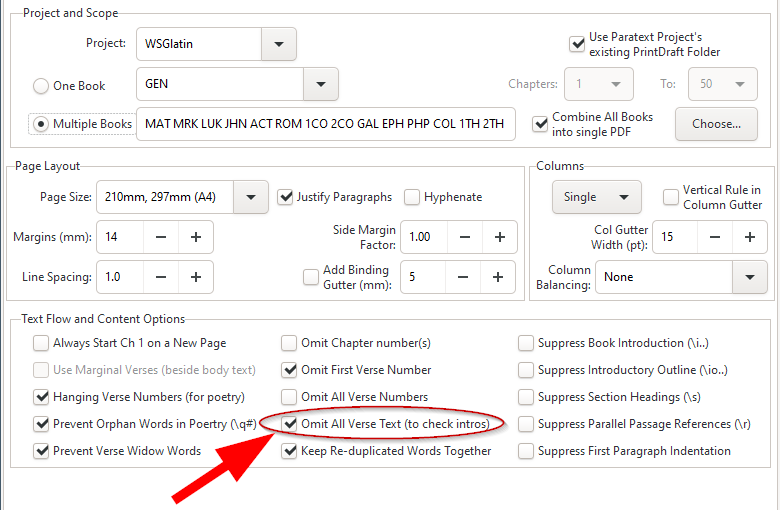

I’m afraid that this tool isn’t yet ready for wider distribution, but if you still need this to be done, then, you could either: (i) add me to your project as an “Observer” and I could generate the PDF and send it back to you, or (ii) wait until this is ready.

较早的帖子 - 以原始语言显示
(3.2k 分) 发布
0

Thank you Mark for your precious reply,
Wow! exactly I want like this. It’s nice to get this tool in print draft. When can we expect this tool in handy? It will make our work very easy. Actually we need PDF frequently for reading, because some of our team members need hard copies.

较早的帖子 - 以原始语言显示
(241 分) 发布

Another, much more complicated way of doing this:

  1. Hold down the “Ctrl” button while clicking “OK” while you’re creating the PDF.
  2. Close the resulting PDF and navigate to the folder \My Paratext Projects\XXX\printdraft (where XXX is your project code).
  3. You will see a few files there. The important ones are the text you’re printing (with a .SFM extension) and the printdraft-XXX-BOOK.tex files.
  4. Edit the XXX-draft.SFM file in a plain-text editor and delete anything you don’t want (probably anything after the first \v 1 marker.
  5. Save that file and then open a command prompt (WinKey-r and type cmd in the open area). Navigate to the same printdraft folder that you had opened earlier.
  6. run the command "c:\Program Files (x86)\Paratext 8\xetex\bin\xetex.exe" printdraft-XXX-BOOK.tex

That should create a pdf, but only with the information you leave in the .SFM file.

较早的帖子 - 以原始语言显示

Please let me know your e-mail ID. I will send you the links and instructions for the PTXprint tool which now makes this easy to do. It is still “Alpha testing” software, but should allow you to do whatever you need with ease.
Mark

较早的帖子 - 以原始语言显示

Thank you so much. My mail Id is [Email Removed]

Regards
Prabhu_beelagi

较早的帖子 - 以原始语言显示

相关问题

0
3 个回答 287 次浏览
Hello, Anytime I use the \ip Introduction - Paragraph marker in Paratext, the words turns grey. I would be grateful if you can help me correct it. Thank you. anon878803
anon878803 132 发布 提问于 十一月 8, 2019
0
2 个回答 698 次浏览
我正在使用 PTXprint 将我的 Paratext 项目文本导出为 PDF 文件 如果在 PTXprint 的 Basic Project and Scope 部分选择 Multiple Books ,并选中圣经的所有书卷,这将创建一个包含圣经所 ... 击 Print ,然后选中另一卷书,再点击 Print ,但那样会很繁琐 有没有办法一步完成?
bit 495 发布 提问于 七月 4, 2022
0
4 个回答 529 次浏览
当从 Paratext 将福音书的一部分导出为 PDF 时,耶稣的红字在文件中没有显示出来。导出为 RTF 时正常,但导出为 PDF 时不行。
ace541611 123 发布 提问于 七月 7, 2021
0
4 个回答 616 次浏览
当我们准备出版新约时,我有点惊讶 PT 中可能的书籍列表并不包括: 圣经导论 旧约导论 新约导论 当然,我们可以使用 XXA–XXC(尽管额外书籍限制为七本,这相当具有约束力!) 关于放置这些导论的最佳实践是什么?
wdavidhj 1.4k 发布 提问于 十一月 25, 2019
0
0 个回答 192 次浏览
In Paratext 8.0 (and later), there are several options to track project progress. From the Project menu, if you ... -the-books-for-which-i-want-to-track-project-progress/1216)
[Expert]
anon421222
735 发布
提问于 二月 23, 2017
Welcome to Support Bible, where you can ask questions and receive answers from other members of the community.
Just as a body, though one, has many parts, but all its many parts form one body, so it is with Christ.
1 Corinthians 12:12
3,048 个问题
6,007 个回答
5,672 条评论
2,027 位用户






