0 голосов
388 просмотров

Hi, I want to take only introduction part as a pdf of each book in one shot. I tried in the option export pdf in which combine book and one book option is there. Otherwise we have to take each introduction part separately. Please suggest me.

Thank you and Regards
Prabhu_beelagi

Старое сообщение — показано на исходном языке
Paratext от (241 очков)
снова показан | 388 просмотров

2 Ответов

0 голосов
Лучший ответ

I’m not sure there is an easy way to do what you’re asking, but I’m currently developing an “enhanced PrintDraft tool” which will make it easy to do what you need (by just checking one option):
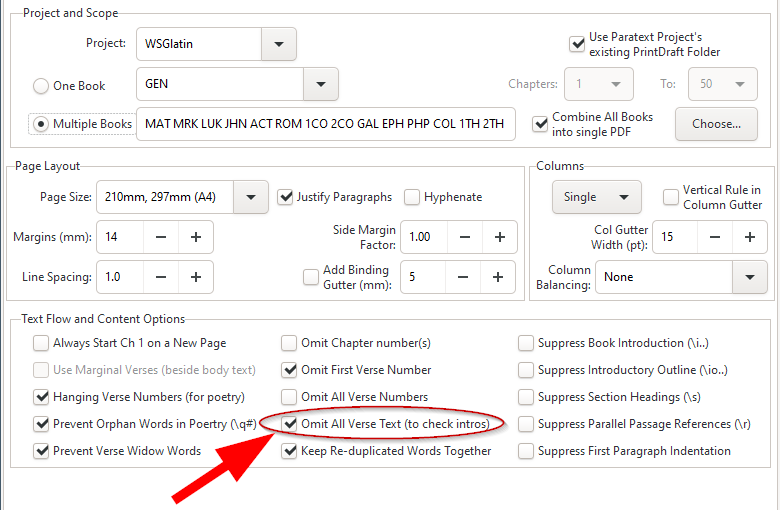

I’m afraid that this tool isn’t yet ready for wider distribution, but if you still need this to be done, then, you could either: (i) add me to your project as an “Observer” and I could generate the PDF and send it back to you, or (ii) wait until this is ready.

Старое сообщение — показано на исходном языке
от (3,2тыс. очков)
0 голосов

Thank you Mark for your precious reply,
Wow! exactly I want like this. It’s nice to get this tool in print draft. When can we expect this tool in handy? It will make our work very easy. Actually we need PDF frequently for reading, because some of our team members need hard copies.

Старое сообщение — показано на исходном языке
от (241 очков)

Another, much more complicated way of doing this:

  1. Hold down the “Ctrl” button while clicking “OK” while you’re creating the PDF.
  2. Close the resulting PDF and navigate to the folder \My Paratext Projects\XXX\printdraft (where XXX is your project code).
  3. You will see a few files there. The important ones are the text you’re printing (with a .SFM extension) and the printdraft-XXX-BOOK.tex files.
  4. Edit the XXX-draft.SFM file in a plain-text editor and delete anything you don’t want (probably anything after the first \v 1 marker.
  5. Save that file and then open a command prompt (WinKey-r and type cmd in the open area). Navigate to the same printdraft folder that you had opened earlier.
  6. run the command "c:\Program Files (x86)\Paratext 8\xetex\bin\xetex.exe" printdraft-XXX-BOOK.tex

That should create a pdf, but only with the information you leave in the .SFM file.

Старое сообщение — показано на исходном языке

Please let me know your e-mail ID. I will send you the links and instructions for the PTXprint tool which now makes this easy to do. It is still “Alpha testing” software, but should allow you to do whatever you need with ease.
Mark

Старое сообщение — показано на исходном языке

Thank you so much. My mail Id is [Email Removed]

Regards
Prabhu_beelagi

Старое сообщение — показано на исходном языке

Похожие вопросы

0 голосов
3 ответов 287 просмотров
Hello, Anytime I use the \ip Introduction - Paragraph marker in Paratext, the words turns grey. I would be grateful if you can help me correct it. Thank you. anon878803
anon878803 132 задал вопрос ноя 8, 2019
0 голосов
2 ответов 698 просмотров
Я использую PTXprint для экспорта текста моего проекта Paratext в файлы PDF. Если я выбираю Несколько книг (Multiple ... утомительно. Есть ли способ сделать это за один шаг?
bit 495 задал вопрос июл 4, 2022
0 голосов
4 ответов 529 просмотров
При экспорте части Евангелий из Paratext в PDF слова Иисуса, выделенные красным цветом, не отображаются в файле. При экспорте в RTF это работает, но не в PDF.
ace541611 123 задал вопрос июл 7, 2021
0 голосов
4 ответов 616 просмотров
По мере подготовки к публикации НЗ я немного удивлён тем, что список возможных книг в PT не включает: Введение ... ли лучшие практики относительно того, где размещать эти введения?
wdavidhj 1,4тыс. задал вопрос ноя 25, 2019
0 голосов
0 ответов 192 просмотров
In Paratext 8.0 (and later), there are several options to track project progress. From the Project menu, if you ... -the-books-for-which-i-want-to-track-project-progress/1216)
[Expert]
anon421222
735
задал вопрос фев 23, 2017
Welcome to Support Bible, where you can ask questions and receive answers from other members of the community.
I urge you, brothers and sisters, to watch out for those who cause divisions and put obstacles in your way that are contrary to the teaching you have learned. Keep away from them.
Romans 16:17
3,048 вопросов
6,007 ответов
5,672 комментариев
2,027 пользователей






