0 票
1.2k 次浏览

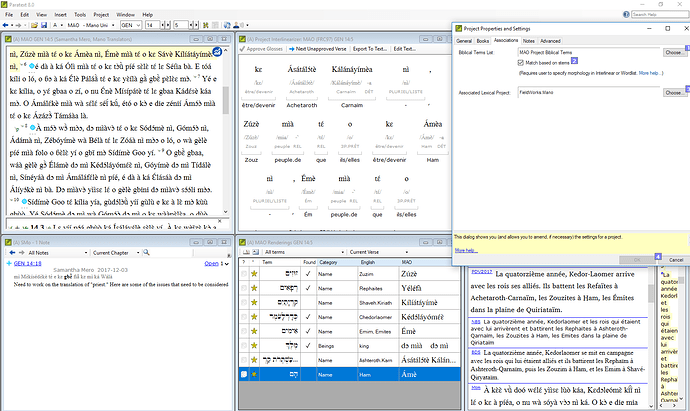
I am trying to use the Match Based on Stems tool in my project, but it does not seem to be working. I have “Match based on stems” checked in Project Properties and Settings. You can see from the screenshot that I have identified the morphology for the name “Ham” (the city) in the interlinear, and that in this verse it has a determiner on it. In the Renderings tool, I have listed only the stem “Ham.” It is my understanding that this should be approved because “Ham” is in the morphology. However, you can see that it is not approved, nor are any of the other city names in the verse because they all have determiners.

If I uncheck “Match based on stems,” all of these will be approved because the determiner is listed in my list of affixes. So, that method works. However, I would prefer to use match based on stems, as it should be more accurate, and I have to make an interlinear for the consultant anyway, so there is really no more work involved. Can anyone help me get this to work?


较早的帖子 - 以原始语言显示
Paratext 中 由 (155 分) 发布 | 1.2k 次浏览

10 个回答

0 票
最佳答案

anon044949,

Thank you for your input. That’s the way the process is supposed to work. But it’s not working in my project for some reason. I shouldn’t need to approve the morphology in both the Wordlist and the Interlinear. Approving in one should automatically approve in the other. And it does. Here is a screenshot of my Wordlist showing Ámèa as correctly parsed:

But for some reason, Renderings still won’t approve the root “Ámè.”

较早的帖子 - 以原始语言显示
由 (155 分) 发布

anon807810, this may not have anything to do with your problem, but I think it’s worth a mention. I see you have diacritics. Is your project Normalized or not (go to Project Properties and Settings, Advanced Tab, Normalization)? If not, are these diacritics, the accents on á, etc, decomposed characters (i.e. a sequence of two characters, the a and the acute accent, in Unicode)? If they are, then it may be that this issue is causing the Match Based on Stems not to work? You are welcome to contact me off list, and we could discuss this further.

较早的帖子 - 以原始语言显示

anon807810,

You are correct that one can use either the word list tool or the interlinearizer. I prefer the word list tool so that I can see all the words with the same root/stem. It is your choice of course. Paratext often has more than one way to do things to suit a wider range of needs.

较早的帖子 - 以原始语言显示
0 票

Looks like a bug in Paratext. Could you use Help > Report a problem to report the issue to us?

较早的帖子 - 以原始语言显示
由 [Expert]
(16.7k 分) 发布
0 票

OK, I have done so. Has anyone else reported this problem or is it just a problem with my copy?

较早的帖子 - 以原始语言显示
由 (155 分) 发布
0 票

I don’t know of any other reports, but I’m also not sure that many projects use the feature since it didn’t work well in PT7.
Since this is blocking your work and I suspect it to be an easy fix, it should be a high priority for us to fix it.

Since I, as an English-only speaker, have a hard time seeing subtle differences in non-English text, can you confirm that all three names shown in your screenshot should be matching?

较早的帖子 - 以原始语言显示
由 [Expert]
(16.7k 分) 发布

已重新显示
0 票

You mean the three names that aren’t checked as “found”? Yes, they should all be checked. In the Interlinearizer, you can see the word Ámèa and that this is made up of the name Ámè plus the determiner -a. Then, at the bottom of the Renderings box, Ámè is listed as the rendering for the name Ham. So this should be checked, but it’s not. The exact same thing is happening for the other two names. They all have a determiner on them.

较早的帖子 - 以原始语言显示
由 (155 分) 发布
0 票

I have gotten this to work and made some training material on this. I will review it and try and help you tomorrow.

较早的帖子 - 以原始语言显示
由 [Expert]
(2.9k 分) 发布

Ok, Sorry but I needed to review the process. I had not thought about it for a while. I think the step you are missing is to go to the Word list tool, click on view morphology and begin marking the morphemes. Only word parses that are approved, i.e. black, will be used by the project interlinearizer. The red parses are only guesses and will not be used by the project interlinearizer. Below is a screen shot of the Word list tool with the morphology column visible. I have a video that shows this method and three others to teach the Biblical terms tool the morphemes of a language if you need more help.

After you have approved the morphemes in either the word list tool or the project interlinearizer, then you will have to go to the Biblical terms tool and approve the stem/root for each term. In the case shown in the above screen capture, I approved “veny” as the rendering of “raise/ἐγείρω”. Paratext does the rest and approves all the renderings for ἐγείρω with the root “veny”!

较早的帖子 - 以原始语言显示
0 票

The problem was deep inside Paratext (not a problem with their project). It was doing a cased compare with the stem and one was uppercased and the other was lowercased. This has been fixed and should be in the next update.

较早的帖子 - 以原始语言显示
由 [Expert]
(16.7k 分) 发布

If the problem is related to the ability to ignore case, I admit that when I have used the stem matching, I never tried cases where case would be an issue. My special area of research is in Bantu languages where mixed capitalization is often allowed in the orthography. Thank you anon807810 for finding this bug.

较早的帖子 - 以原始语言显示
0 票

Thanks for your help, everyone.
anon758749: The project normalization is decomposed, yes. I changed this when PT8 came out to fix a problem with the Wordlist listing the same word multiple times. I hope I didn’t fix one problem only to create another.

anon291708: I hope you’re right that this will fix the problem, though I don’t understand why it would. Nothing was lower case. Ámè is a proper name and is always upper case, both in the text and the Renderings. But I know nothing of programing, so I probably just don’t understand what you mean.

anon807810

较早的帖子 - 以原始语言显示
由 (155 分) 发布

This was deep in the code where it was doing a comparison to the lexicon entry. Lexicon entries are stored all lowercase for the interlinear, internally. In this particular instance, we forgot that fact and did a direct compare instead of a caseless compare.

较早的帖子 - 以原始语言显示

Gotcha! (I think.) Anyway, I will look forward to the next update.

较早的帖子 - 以原始语言显示
0 票

The fix should be in 8.0.100.67 which should be going out to everyone soon.

较早的帖子 - 以原始语言显示
由 [Expert]
(16.7k 分) 发布

Very great that you could diagnose the problem and fix it. Sometimes bugs that only show up in very specific and rare situations are hard to interpret.

较早的帖子 - 以原始语言显示
0 票

4 posts were split to a new topic: Biblical Term counts not updating

较早的帖子 - 以原始语言显示
由 [Expert]
(16.7k 分) 发布

相关问题

0 票
1 个回答 230 次浏览
我正在处理一种语言,其中带有前缀和后缀的词可以通过重叠来表示复数 在正字法中,使用 - 来标记重叠 当带有前缀和后缀的形式发生重叠时,词表(Wordlist)似乎无法处理其形态变化 它认为整个形式都是词干,如果我尝试在 ... Paratext 不允许在后缀之后添加前缀 有没有什么想法可以处理这种情况?还是说这超出了 Paratext 当前的功能范围?
fhardison8588 111 发布 提问于 十二月 12, 2022
0 票
1 个回答 186 次浏览
您好, 我代一位同事发帖,他在项目中遇到了一个关于逐词对照(Interlinearizer)的奇怪问题 他已经为几卷书完成了大量的逐词对照工作,但是,当他想在 分配与进度 (Assignments and Progress)中将该卷书的状态标记为 完成 时, ... ?是否是我们设置不当,导致逐词对照的文件没有与 分配与进度 窗口关联?任何帮助都将不胜感激
KmSilvey 109 发布 提问于 十一月 14, 2022
0 票
2 个回答 348 次浏览
我希望确保每一节经文都至少经过团队中两位成员的批准 以前,我们使用过定制软件(不是 Paratext),该软件允许用户登录并标记他们批准的经文,因此我们可以自信地说: 这本书中的每一节经文都至少经过团队中两个人的批准 批准标记 ... 知,Paratext 不提供此功能,但也许它确实提供,只是我忽略了什么 也许有一种方法可以 黑 一下回译功能来实现这一点?
bit 495 发布 提问于 四月 19, 2022
0 票
4 个回答 2.0k 次浏览
在这里我得坦白一下,我对希伯来语知之甚少,但我正在尝试弄清楚如何找到我认为应该出现在 Biblical Terms (圣经术语)工具中的内容 Ezk. 14:20 中有单词 בְצִדְקָתָ֖ם,在 Source Language Text (源语言 ... 处理这类问题,但也许我的方法不对?我搜索了 Vimeo 视频寻找帮助,但没有找到任何相关内容
Paul 642 发布 提问于 二月 3, 2021
0 票
4 个回答 746 次浏览
项目基于词干(stem-based)的设置已经顺利运行好几个星期了 该语言会产生许多复合词 它们可以是名词 动词 形容词以及 更糟糕 的组合 当然,这些成分的组合是有 规则 的,而且合乎逻辑,每个复合词都可以 ... 言,他们说 overmother (过度母亲/大母亲),其中 mother 是意为 母亲 的词干, over 是意为 μέγας 的前缀 )
Tim 934 发布 提问于 四月 24, 2019
Welcome to Support Bible, where you can ask questions and receive answers from other members of the community.
And over all these virtues put on love, which binds them all together in perfect unity.
Colossians 3:14
3,052 个问题
6,011 个回答
5,677 条评论
2,032 位用户




