0
353 次瀏覽

The chapter numbers are not being place correctly in print draft outputs.
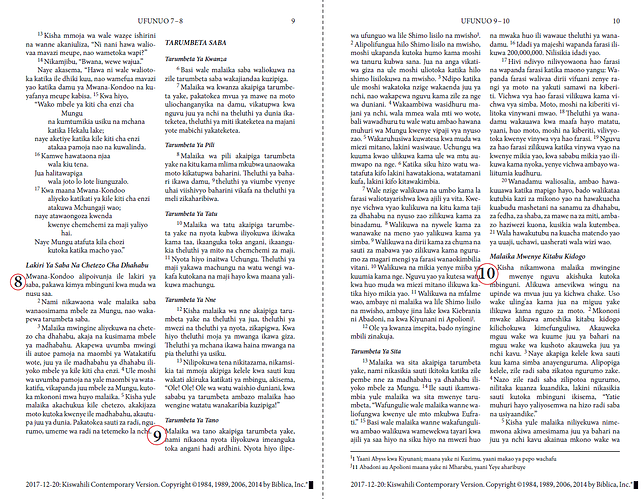

Paratext 8 — Font: Minion Pro Size: 9pt Line spacing 1.0 Margins 12mm

What is interesting is that the second line for chapter 10 appears to have been indented to accommodate the chapter number. The issue seems to be the first line of paragraphs.
The same sort of thing happens with single column non-justified layout and at wider line spacings.Sometimes the second line is indented for the chapter numbers, sometimes not. But never is the first line correctly placed.
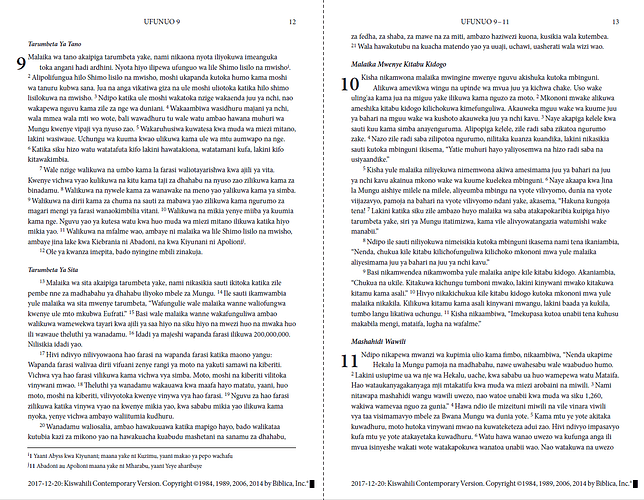

Paratext 8 — Font: Minion Pro Size: 9pt Line spacing 1.2 Margins 12mm
  • What might be wrong?
  • What might be the fix?
  • Any tips on how to trouble shoot this?

Answering my own question, I removed the custom.sty, and Lo! it worked like a charm.
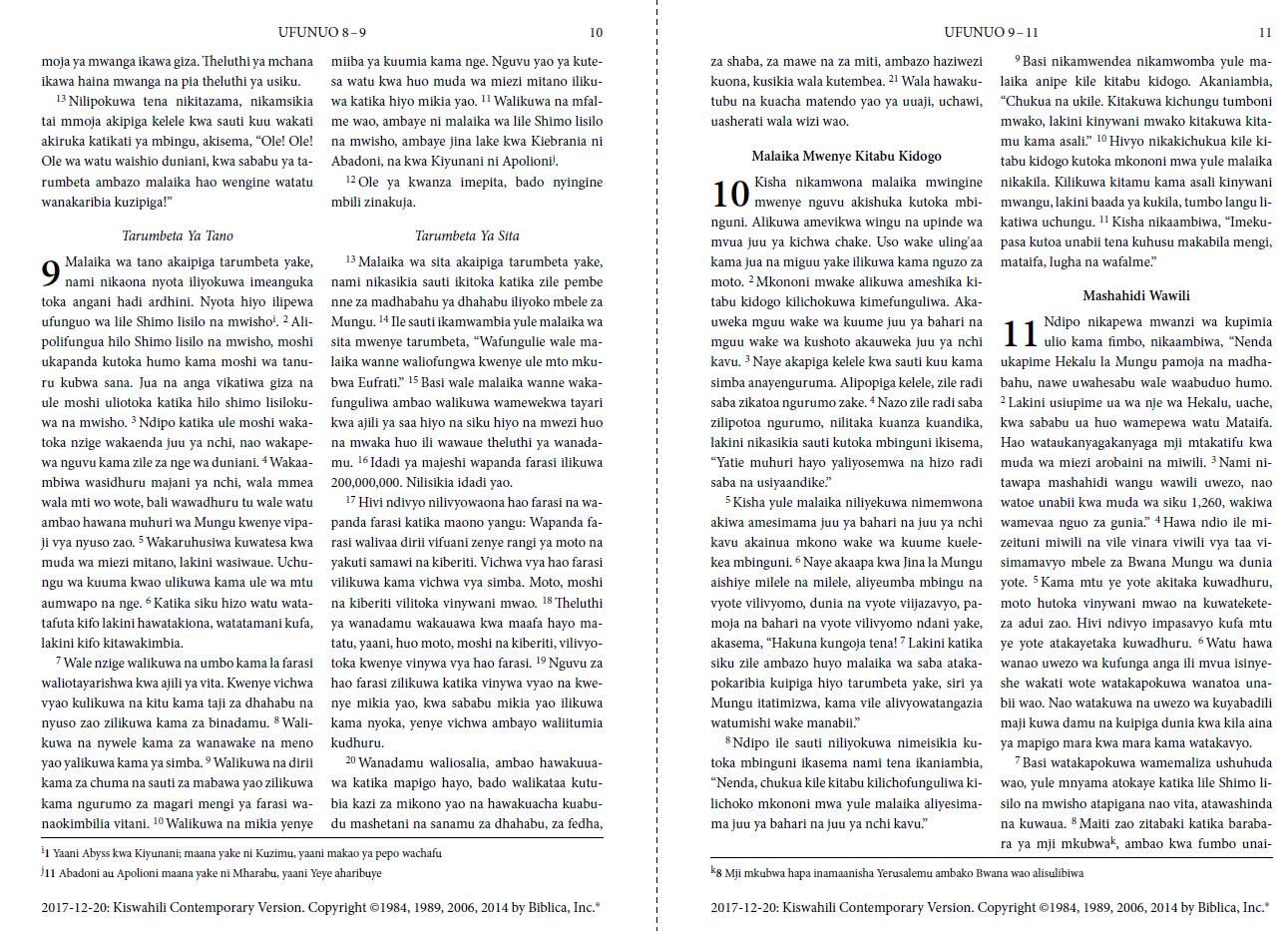

Paratext 8 No custom.sty — Font: Minion Pro Size: 9pt Line spacing 1.2 Margins 12mm

The new questions are:

  • What in my style sheet causes chapter number placement to fail?
  • What am I allowed to do and what do I need to avoid so as not to break chapter number placement?

舊文章 - 以原文顯示
Paratext (1.8k 點) 提出
已重新顯示 | 353 次瀏覽

2 個回答

0
最佳回答

It looks like someone modified the printdraft macros. I think you should
start with a fresh version of PrintDraft-mods.tex and modify it. Somebody
has modified it to not print verse 1, so I suspect something else was
accidently modified. Or possibly PrintDraft-mods.sty was modified.
If you want to send me both of those files (from the PrintDraft folder) I
might be able to tell you.
Lorna

舊文章 - 以原文顯示
(329 點) 提出
已重新顯示

I did that in my PrintDraftChanges file. But I would like to know if you see anything else amiss

舊文章 - 以原文顯示

I don’t see an attachment, does this site not allow attachments?

Instead of doing the verse removal in PrintDraftChanges do it in
PrintDraft-mods,tex

Go into that file and remove the “%” in front of this line (line 56 or
thereabouts):
\OmitVerseNumberOnetrue

In the TeX world the “%” is a commented out line.

See if that does the trick. I suspect whatever you are removing in
PrintDraftChanges is required for use in the macros to trigger the dropchap
number.

Lorna

舊文章 - 以原文顯示

CrazyRocky,
Did you ever figure out how to make this change using PrintDraft-mods.tex? I think that will solve your problems. If you need help, let me know.
I also have a special modified PrintDraft-mods.tex file for people who need it for Arabic script.
Lorna

舊文章 - 以原文顯示
0

The other thing that doesn’t look right is that the header for page 9 should be UFUNUO 7-9, no?

Paul

舊文章 - 以原文顯示
(642 點) 提出
已重新顯示

相關問題

0
2 個回答 318 次瀏覽
In my project I sometimes employ the inline (character-level) markers \add \add* to mark additions to the text. In ... (appearing in bold italic, but not on a new line).
MatjazCrnivec 176 提出 已提問 7月 28, 2020
0
4 個回答 607 次瀏覽
We have a user who is experiencing a problem where a certain character combination does not present correctly using the Print ... when the user should get Any ideas? Thank you.
MSEAIT_LT 478 提出 已提問 3月 21, 2018
0
2 個回答 304 次瀏覽
帶領者將暫時離開專案 當地團隊被要求透過多個版本的閱讀以及一些個人研讀(不只是看註釋,而是真正檢視經文)來準備「下一卷書」: 我們希望用雷射印表機列印兩份,使用大字體和寬邊距,並請團隊用不同顏色標記: 經文中所有的人物 所有 ... 以便研讀和以大字體 良好間距和邊距列印,需要大量的格式調整工作 如果從 Paratext 的草稿列印功能中進行,會有效率得多
Tim 934 提出 已提問 4月 22, 2022
0
4 個回答 411 次瀏覽
我該如何設定右邊距?文字似乎沒有換行。 這是日文,並使用了 Ruby 文字(振假名)功能。 我使用的是 PTX 9.1。 謝謝。
anon180868 195 提出 已提問 12月 29, 2020
0
3 個回答 434 次瀏覽
Making small changes to the text printed by Print Draft is easy but only if you or someone you know speaks ... replace it with an empty string (effectively deleting it).
匿名 提出 已提問 6月 3, 2015
Welcome to Support Bible, where you can ask questions and receive answers from other members of the community.
They all joined together constantly in prayer, along with the women and Mary the mother of Jesus, and with his brothers.
Acts 1:14
3,049 個問題
6,007 個回答
5,672 則評論
2,029 位使用者





