0 votes
552 views
[Hypothetical description based on a real event]

A team member had a Windows crash which corrupted a book in our project. When he did a send/receive the corrupted version did not get replaced, but it replaced the good version for everyone. Our admin tried to undo that user's changes in Project History. That got rid of the corruption but it did not bring back all the latest changes to the book. What should be done?
Paratext by [Expert]
(3.3k points)
| 552 views

2 Answers

0 votes

Unfortunately, I think you'd have to use Compare versions to look at all the changes made to the text by the other users and merge them back in.

by [Expert]
(16.7k points)
Just what I was about to say, Tim. Good job!
I'm confused. If this sort of mistake would have to be undone manually inside of PT, isn't the correct answer for a person in this situation to ask someone with more computer knowledge to roll back to a specific save point for them with something like Tortoise HG? This situation wouldn't prevent someone using the Mercurial save points and saying "revert to" some point, would it?
This kind of mistake can be undone using TortoiseHG, in fact that is what I use when these kind of issues come up. But I wrote this up to show that the issues can be addressed in Paratext, for those who do not know TortoiseHG
0 votes

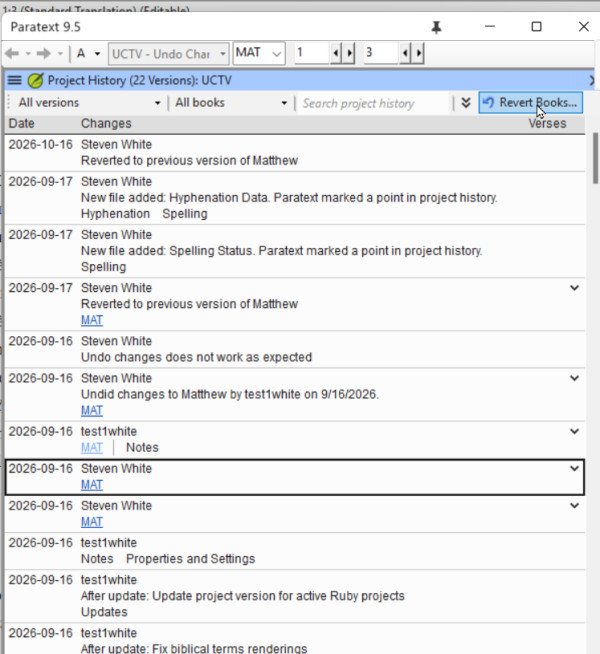
I have seen this happen. It turns out, that if the team member did not have the latest version of the book when the corruption took place, Undo changes does not roll back to the latest version, but to the version that user had on their computer. 
If a file gets corrupted and then sent, the admin should verify what version of the book or books they are going to get if they undo changes.

When you find in Recent Changes or Project History the point where the file was corrupted, click the link to open compare versions, and examine the right hand side. That is the version that Undo changes will roll back to. If that is not the latest version, look at other changes to that book, and when you find the latest good changes, use the Revert books command to bring that version back. 
image

Some general principles that also might help avoid this scenario.
1. If you have a systems crash and you detect something bad has happened to your Paratext project, DO NOT send receive the corrupted project.  Delete the project from your computer, then do  a send/receive to get the uncorrupted project from the server.

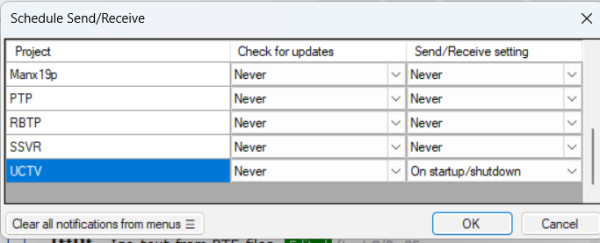
2) If you have a good and inexpensive Internet connection, always do send/receive before you start work in Paratext (to get the latest changes from your teammates) and send/receive when you finish work in Paratext.  You can make this automatic by scheduling your send/receive on startup and shutdown: This will decrease the possibility that Undo Changes would not bring back the latest version. 
image

by [Expert]
(3.3k points)

Related questions

0 votes
0 answers 228 views
I am not able to put numbers as the first characters in a table cell in a RTL document without adding unwanted markers and spaces, ... [LTR] 456 \tr \tc1 [LTR]123 \tc2 [LTR]456
Kent Spielmann 1.8k asked Feb 3, 2022
0 votes
2 answers 1.1k views
One of the improvements of 9.4 Beta is stated like this: Improved quotation checking. The new Quotation Types Basic Check knows where ... "7.4" to "9.3" and "9.4", respectively]
Iver Larsen 869 asked Sep 1, 2023
0 votes
3 answers 790 views
I am trying to insert a set of figure expressions (\fig \fig*) into a project using the custom tool ... better way to bulk insert figures into the project? Paulus+Kieviet
Paulus Kieviet 517 asked Jan 25, 2023
0 votes
3 answers 667 views
At a recent Introduction to Paratext workshop, one of the attendees was using Paratext 8 on Wasta-Linux. Not being ... to get the AutoCorrect.txt feature to work? Thank you
MSEAIT_LT 478 asked Dec 1, 2017
0 votes
3 answers 511 views
I have run into a weird issue on a user's computer running PT 7.5 and was wondering if anybody else had ... | Papua New Guinea [Email Removed].pgmailto:[Email Removed].pg
SIL LSS PNG 411 asked Sep 6, 2017
Welcome to Support Bible, where you can ask questions and receive answers from other members of the community.
Don’t you know that you yourselves are God’s temple and that God’s Spirit dwells in your midst?
1 Corinthians 3:16
3,079 questions
6,045 answers
5,708 comments
2,046 users