Я сталкивался с этим. Оказывается, если у члена команды не было последней версии книги в момент, когда произошло повреждение, команда Undo changes [Отменить изменения] не откатывает текст к последней версии, а к той версии, которая была у пользователя на компьютере.
Если файл повреждается, а затем отправляется, администратор должен проверить, какая версия книги или книг будет получена при отмене изменений.
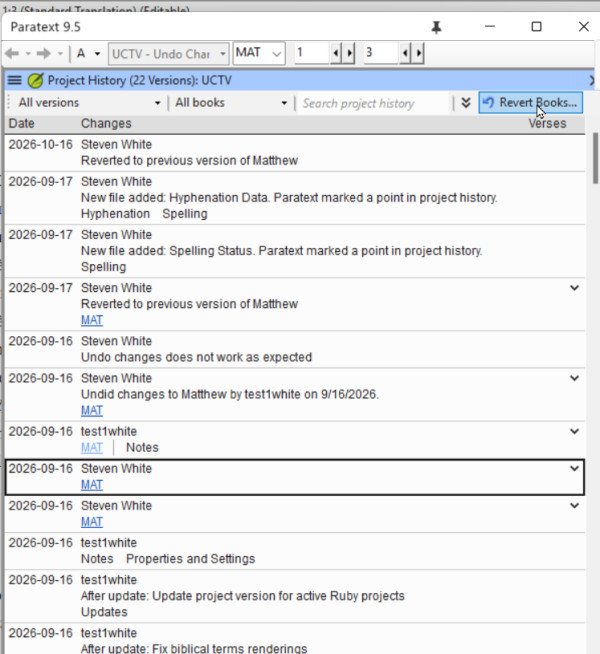
Когда вы найдёте в Recent Changes [Недавние изменения] или Project History [История проекта] момент, когда файл был повреждён, нажмите на ссылку, чтобы открыть сравнение версий, и изучите правую часть. Это та версия, к которой откатит команда Undo changes. Если это не последняя версия, посмотрите другие изменения этой книги, и когда найдёте последние корректные изменения, используйте команду Revert books [Откатить книги], чтобы вернуть эту версию.
Некоторые общие принципы, которые также могут помочь избежать этой ситуации.
1. Если у вас произошла системная ошибка и вы обнаружили, что с вашим проектом Paratext что-то случилось, НЕ отправляйте/не получайте [Send/Receive] повреждённый проект. Удалите проект с вашего компьютера, а затем выполните send/receive, чтобы получить неповреждённый проект с сервера.
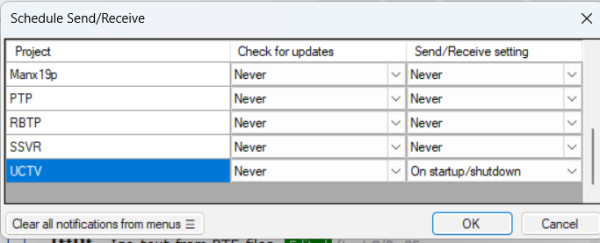
2) Если у вас есть стабильное и недорогое интернет-соединение, всегда выполняйте send/receive перед началом работы в Paratext (чтобы получить последние изменения от ваших коллег) и send/receive после завершения работы в Paratext. Вы можете автоматизировать этот процесс, настроив send/receive при запуске и завершении работы: это снизит вероятность того, что Undo Changes не вернёт последнюю версию.
I have seen this happen. It turns out, that if the team member did not have the latest version of the book when the corruption took place, Undo changes does not roll back to the latest version, but to the version that user had on their computer.
If a file gets corrupted and then sent, the admin should verify what version of the book or books they are going to get if they undo changes.
When you find in Recent Changes or Project History the point where the file was corrupted, click the link to open compare versions, and examine the right hand side. That is the version that Undo changes will roll back to. If that is not the latest version, look at other changes to that book, and when you find the latest good changes, use the Revert books command to bring that version back.
Some general principles that also might help avoid this scenario.
1. If you have a systems crash and you detect something bad has happened to your Paratext project, DO NOT send receive the corrupted project. Delete the project from your computer, then do a send/receive to get the uncorrupted project from the server.
2) If you have a good and inexpensive Internet connection, always do send/receive before you start work in Paratext (to get the latest changes from your teammates) and send/receive when you finish work in Paratext. You can make this automatic by scheduling your send/receive on startup and shutdown: This will decrease the possibility that Undo Changes would not bring back the latest version.