Saya pernah melihat hal ini terjadi. Ternyata, jika anggota tim tidak memiliki versi terbaru dari kitab tersebut saat kerusakan terjadi, Undo changes tidak akan mengembalikan ke versi terbaru, melainkan ke versi yang ada di komputer pengguna tersebut.
Jika sebuah file rusak dan kemudian dikirim, admin harus memverifikasi versi kitab apa yang akan mereka dapatkan jika mereka melakukan undo changes.
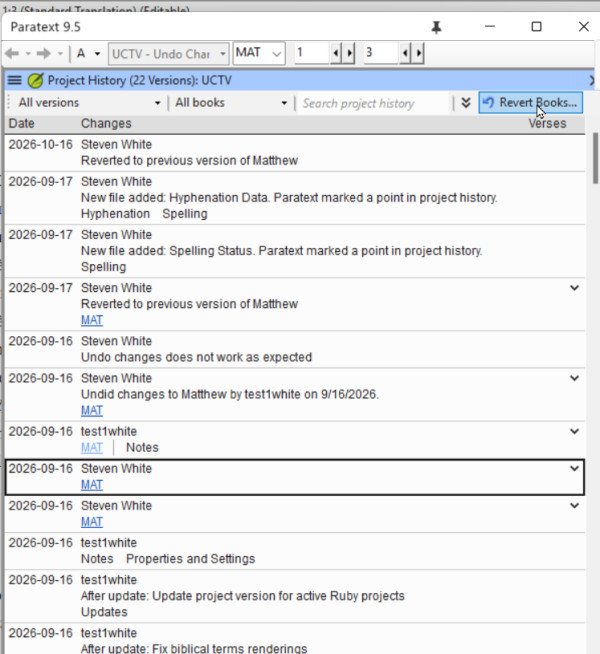
Quando Anda menemukan di Recent Changes atau Project History titik di mana file tersebut rusak, klik tautan untuk membuka compare versions, dan periksa sisi kanan. Itulah versi yang akan dikembalikan oleh Undo changes. Jika itu bukan versi terbaru, lihat perubahan lain pada kitab tersebut, dan ketika Anda menemukan perubahan baik terbaru, gunakan perintah Revert books untuk mengembalikan versi tersebut.
Beberapa prinsip umum yang juga mungkin membantu menghindari skenario ini.
1. Jika Anda mengalami crash sistem dan Anda mendeteksi bahwa sesuatu yang buruk telah terjadi pada proyek Paratext Anda, JANGAN lakukan send/receive proyek yang rusak tersebut. Hapus proyek dari komputer Anda, lalu lakukan send/receive untuk mendapatkan proyek yang tidak rusak dari server.
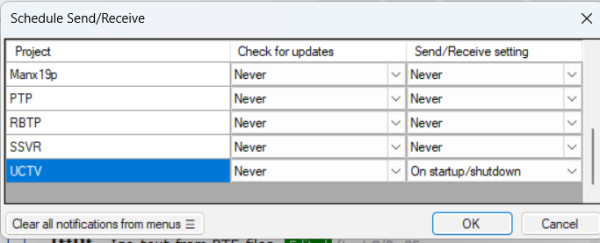
2) Jika Anda memiliki koneksi Internet yang baik dan terjangkau, selalu lakukan send/receive sebelum Anda mulai bekerja di Paratext (untuk mendapatkan perubahan terbaru dari rekan tim Anda) dan send/receive ketika Anda selesai bekerja di Paratext. Anda dapat membuat ini otomatis dengan menjadwalkan send/receive saat startup dan shutdown: Ini akan mengurangi kemungkinan bahwa Undo Changes tidak akan mengembalikan versi terbaru.
I have seen this happen. It turns out, that if the team member did not have the latest version of the book when the corruption took place, Undo changes does not roll back to the latest version, but to the version that user had on their computer.
If a file gets corrupted and then sent, the admin should verify what version of the book or books they are going to get if they undo changes.
When you find in Recent Changes or Project History the point where the file was corrupted, click the link to open compare versions, and examine the right hand side. That is the version that Undo changes will roll back to. If that is not the latest version, look at other changes to that book, and when you find the latest good changes, use the Revert books command to bring that version back.
Some general principles that also might help avoid this scenario.
1. If you have a systems crash and you detect something bad has happened to your Paratext project, DO NOT send receive the corrupted project. Delete the project from your computer, then do a send/receive to get the uncorrupted project from the server.
2) If you have a good and inexpensive Internet connection, always do send/receive before you start work in Paratext (to get the latest changes from your teammates) and send/receive when you finish work in Paratext. You can make this automatic by scheduling your send/receive on startup and shutdown: This will decrease the possibility that Undo Changes would not bring back the latest version.
Diterjemahkan secara otomatis dari English