He visto que esto ocurre. Resulta que, si el miembro del equipo no tenía la última versión del libro cuando se produjo la corrupción, el comando Undo changes (Deshacer cambios) no revierte a la última versión, sino a la versión que ese usuario tenía en su computadora.
Si un archivo se corrompe y luego se envía, el administrador debe verificar qué versión del libro o de los libros recibirá si ejecuta Undo changes (Deshacer cambios).
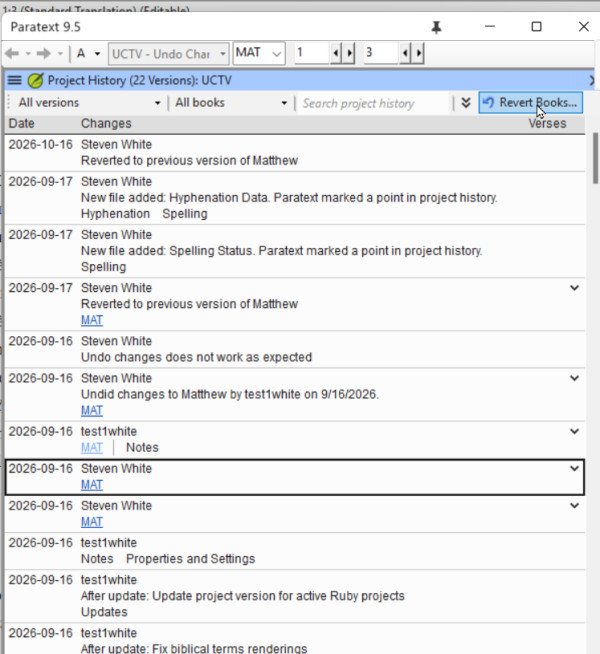
Cuando encuentre en Recent Changes (Cambios recientes) o Project History (Historial del proyecto) el punto donde el archivo se corrompió, haga clic en el enlace para abrir compare versions (comparar versiones) y examine el lado derecho. Esa es la versión a la que revierte Undo changes (Deshacer cambios). Si no es la última versión, examine otros cambios de ese libro y, cuando encuentre los últimos cambios correctos, use el comando Revert books (Revertir libros) para recuperar esa versión.
Algunos principios generales que también pueden ayudar a evitar este escenario.
1. Si tiene un fallo del sistema y detecta que algo malo ha ocurrido en su proyecto de Paratext, NO realice send/receive (enviar/recibir) del proyecto corrupto. Elimine el proyecto de su computadora y luego realice un send/receive (enviar/recibir) para obtener el proyecto no corrupto del servidor.
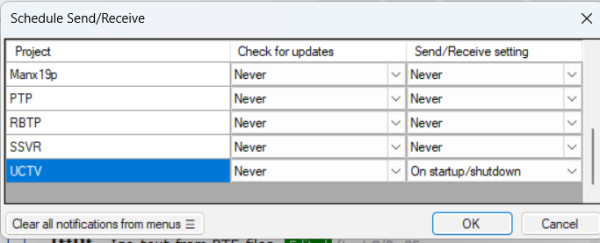
2) Si tiene una conexión a Internet buena y económica, realice siempre send/receive (enviar/recibir) antes de comenzar a trabajar en Paratext (para obtener los últimos cambios de sus compañeros de equipo) y realice send/receive (enviar/recibir) cuando termine de trabajar en Paratext. Puede automatizar esto programando su send/receive (enviar/recibir) al iniciar y al cerrar sesión: esto disminuirá la posibilidad de que Undo Changes (Deshacer cambios) no recupere la última versión.
I have seen this happen. It turns out, that if the team member did not have the latest version of the book when the corruption took place, Undo changes does not roll back to the latest version, but to the version that user had on their computer.
If a file gets corrupted and then sent, the admin should verify what version of the book or books they are going to get if they undo changes.
When you find in Recent Changes or Project History the point where the file was corrupted, click the link to open compare versions, and examine the right hand side. That is the version that Undo changes will roll back to. If that is not the latest version, look at other changes to that book, and when you find the latest good changes, use the Revert books command to bring that version back.
Some general principles that also might help avoid this scenario.
1. If you have a systems crash and you detect something bad has happened to your Paratext project, DO NOT send receive the corrupted project. Delete the project from your computer, then do a send/receive to get the uncorrupted project from the server.
2) If you have a good and inexpensive Internet connection, always do send/receive before you start work in Paratext (to get the latest changes from your teammates) and send/receive when you finish work in Paratext. You can make this automatic by scheduling your send/receive on startup and shutdown: This will decrease the possibility that Undo Changes would not bring back the latest version.
Traducción automática desde English