不要全信“支持代理”(Support Agent)说的话 :-) 当它不知道正确答案时,默认行为就是“幻觉”!所以请删除你尝试创建的那个 ptxprint-PSA.sty 文件。那完全没用。
我不确定你目前的《诗篇》使用了哪些标记,但诗歌通常使用 \q1 和 \q2。如果你希望《诗篇》中的诗歌居中,那么请基于现有的 \q1 和 \q2 添加样式(即一两个新标记),但限制它们仅适用于 PSA,如下所示:
id:PSA|q1
id:PSA|q2
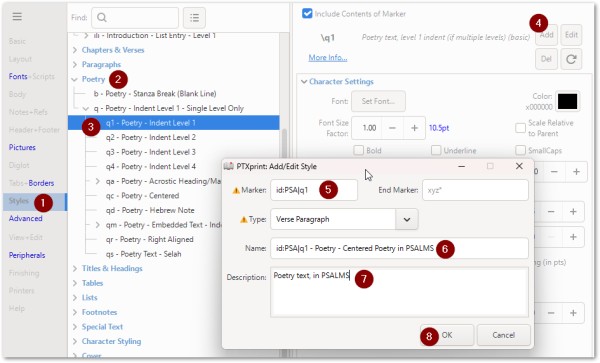
然后,一旦添加了新样式(限制为仅适用于 PSA),你就可以如图所示修改其参数:
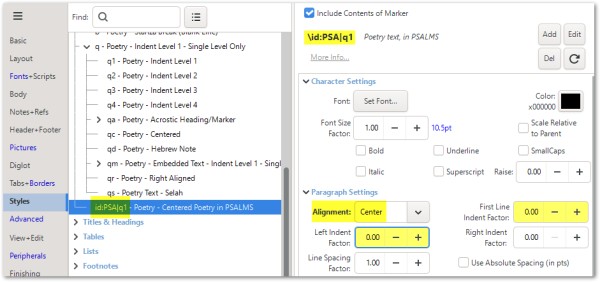
关于样式命名的更多帮助,请参阅技术参考手册第 14 页(见“帮助”选项卡)。
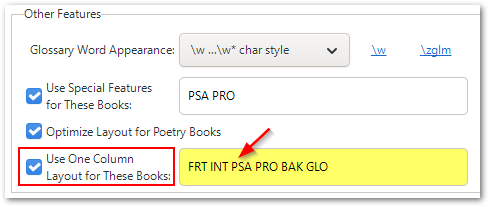
请注意,要在双栏出版物中为 PSA 实现单栏布局,你需要在“正文”(Body)选项卡上,靠近屏幕底部的位置进行设置。
Don't believe everything the Support Agent tells you :-) Hallucination is its default action when it doesn't know the right answer! So please remove the ptxprint-PSA.sty file that you tried. That will not help at all.
I'm not sure what markers your Psalms are currently marked up with, but usually it is \q1 and \q2 for poetry. So if you wanted poetry within the Psalms to be centered, then Add the style(s) (i.e. a new marker or two) based on the existing \q1 and \q2, but limit them to only apply to PSA as shown below:
id:PSA|q1
id:PSA|q2
Then once the NEW style has been added (restricted to work with PSA) you can change it's parameters as shown here:
There is more help on naming of Styles on Pg14 of the technical reference manual (see Help tab).
Note that to get ONE-column layout for PSA in a TWO-column publication, you will need to set this on the Body tab, near the bottom of the screen.
机器翻译自 English








