No crea todo lo que le dice el Agente de Soporte :-) ¡La alucinación es su acción predeterminada cuando no sabe la respuesta correcta! Así que, por favor, elimine el archivo ptxprint-PSA.sty que intentó. Eso no ayudará en absoluto.
No estoy seguro de con qué marcadores están marcados actualmente sus Salmos, pero normalmente se usa \q1 y \q2 para la poesía. Por lo tanto, si desea que la poesía dentro de los Salmos esté centrada, agregue el/los estilo(s) (es decir, uno o dos nuevos marcadores) basados en los existentes \q1 y \q2, pero límitelos para que se apliquen solo a PSA, como se muestra a continuación:
id:PSA|q1
id:PSA|q2
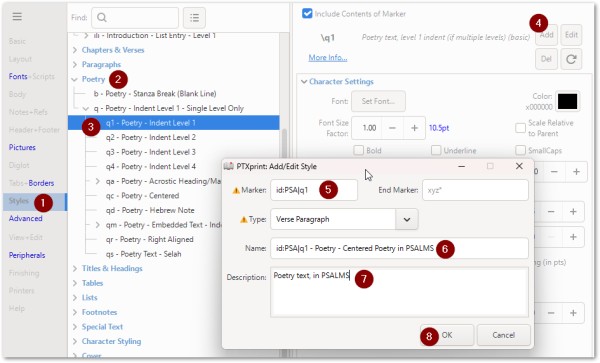
Luego, una vez que se haya agregado el NUEVO estilo (restringido para funcionar con PSA), puede cambiar sus parámetros como se muestra aquí:
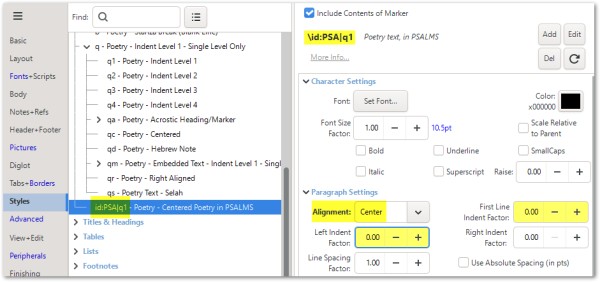
Hay más ayuda sobre la nomenclatura de los estilos en la página 14 del manual de referencia técnica (vea la pestaña Ayuda).
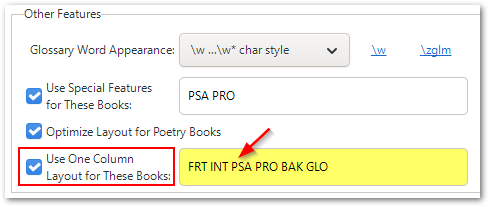
Tenga en cuenta que, para obtener un diseño de UNA columna para PSA en una publicación de DOS columnas, deberá configurar esto en la pestaña Body, cerca de la parte inferior de la pantalla.
Don't believe everything the Support Agent tells you :-) Hallucination is its default action when it doesn't know the right answer! So please remove the ptxprint-PSA.sty file that you tried. That will not help at all.
I'm not sure what markers your Psalms are currently marked up with, but usually it is \q1 and \q2 for poetry. So if you wanted poetry within the Psalms to be centered, then Add the style(s) (i.e. a new marker or two) based on the existing \q1 and \q2, but limit them to only apply to PSA as shown below:
id:PSA|q1
id:PSA|q2
Then once the NEW style has been added (restricted to work with PSA) you can change it's parameters as shown here:
There is more help on naming of Styles on Pg14 of the technical reference manual (see Help tab).
Note that to get ONE-column layout for PSA in a TWO-column publication, you will need to set this on the Body tab, near the bottom of the screen.








