0 votes
184 views

Hi

I would like to have the Psalms in one column. That works. But how do I center the Psalms?

The "Support Agent" advised me to use the \pc style, but it gave me an error.

The "Support Agent" also said that I could create a file shared/ptxprint/Default/ptxprint-PSA.sty with the content

\Marker p
\Justification Center
\FirstLineIndent 0

But how do I tell PTXprint to use it?

PTXprint by (104 points) | 184 views

1 Answer

0 votes

Don't believe everything the Support Agent tells you :-)  Hallucination is its default action when it doesn't know the right answer! So please remove the ptxprint-PSA.sty file that you tried. That will not help at all.

I'm not sure what markers your Psalms are currently marked up with, but usually it is \q1 and \q2 for poetry. So if you wanted poetry within the Psalms to be centered, then Add the style(s) (i.e. a new marker or two) based on the existing \q1 and \q2, but limit them to only apply to PSA as shown below:

id:PSA|q1

id:PSA|q2
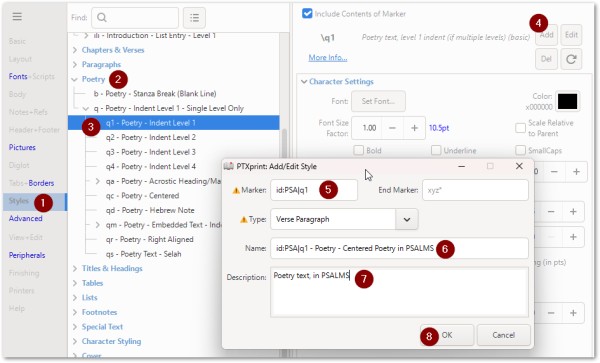
image

Then once the NEW style has been added (restricted to work with PSA) you can change it's parameters as shown here:
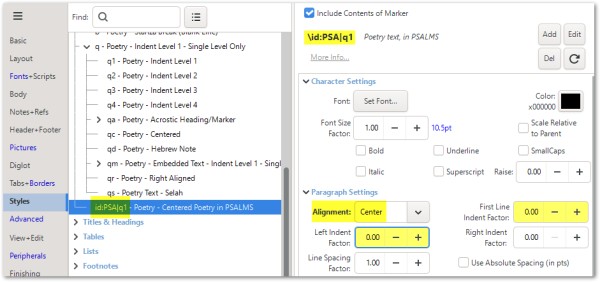
image

There is more help on naming of Styles on Pg14 of the technical reference manual (see Help tab).

Note that to get ONE-column layout for PSA in a TWO-column publication, you will need to set this on the Body tab, near the bottom of the screen.
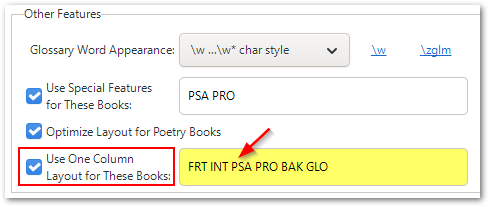

image

by (3.2k points)

I do not have formatting in Psalms with \q1 or \g2
In Psalms (one column) I did new style

   id:PSA|p - Paragraph - Normal - Centered

in usfm I use \p \qr Sela. \p


In HAB I use in usfm file
  qr Sela.\p

changes.txt
at HAB "\\qr Sela." > "\\zpqr Sela.\\zpqr*"

and tweak from slides.

ptxprint-mod.tex
% Move the \zpqr word up to the end of previous line (if space permits)
\sethook{start}{zpqr}{\unskip\nobreak\hfill\penalty50\hskip0.3em\hbox{}\nobreak\hfill\hbox\bgroup}
\sethook{end}{zpqr}{\egroup}


And my further question is how can I achieve more line spacing. At line 40 is now \p
With what should I change \p?

\v 39 Kajti spomnil se je, da \add so bili\add* \add samo\add* meso, veter, ki premine in ne prihaja ponovno.
\p
\v 40 Kako pogosto so ga dražili\f + \fr 78,40: \ft ga dražili: ali, se upirali.\f* v divjini \add in\add* ga žalostili v puščavi!

Add a \b line before \p. That adds a blank line.

Related questions

0 votes
1 answer 46 views
Greetings, As I create the Strong's Number Index it appears like this, where the reference look like this "$a(Mat 1:11)" How do I correct this?
Kevin Nicholas 142 asked Apr 26, 2025
0 votes
1 answer 316 views
I have three auxiliary projects in Paratext, that contain the text of a booklet that is being produced in the three different ... , and if so, which files and from where to where?
muckles 116 asked Jan 13, 2021
0 votes
1 answer 198 views
I am working on a single-book publication. In the past for single books, I've been able to put a header with a ... toggle this on or off. What else can I do to troubleshoot?
Rebecca Peak 102 asked Jun 25
0 votes
2 answers 1.0k views
I'm using PTXprint to export my Paratext project text to PDF files. If I choose Multiple Books under the Basic , Project ... be tedious. Is there a way to do it in one step?
bit 495 asked Jul 4, 2022
0 votes
1 answer 217 views
Our Paratext files include \cl Chapter Labes for Psalms. We would like to try the Psalms with drop caps. I ... ignore the Chapter Labels and produce the Psalms with drop caps?
Iska 164 asked Mar 14, 2025
Welcome to Support Bible, where you can ask questions and receive answers from other members of the community.
Every day they continued to meet together in the temple courts. They broke bread in their homes and ate together with glad and sincere hearts, praising God and enjoying the favor of all the people. And the Lord added to their number daily those who were being saved.
Acts 2:46-47
3,065 questions
6,025 answers
5,696 comments
2,036 users





