时不时地,我会“将一章中的所有节标记为已完成”(通常是在我执行了查找替换以统一回译的一致性之后,然后我需要让受此更改影响的已完成章节显示为已完成)。任何做过这件事的人都会注意到,“将整本书中的所有节标记为已完成”与“将一章中的所有节标记为已完成”非常接近,而且点击它时没有“确定吗?”对话框。
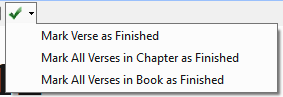
我刚才不小心点击了将整本书中的所有节标记为已完成。我立即尝试撤销,但这对完成状态勾选框没有帮助。然后我执行了 Send/Receive,以便我可以在 Project History 中恢复到之前的状态(即我犯错前的状态)。恢复到之前的状态对勾选框没有影响。当然,Recent Changes 对话框也缺少针对 Status Check Boxes 的撤销选项。
所以我的问题是,是否有简单的方法可以恢复到之前的勾选状态?
From time to time, I "Mark All Verses in a Chapter as Finished" (usually when I've done a find-replace to bring consistency in our Back Translation, and I then need to get already-finished chapters affected by the change to show that they are don). As anyone who has done this will have noticed, "Mark All Verses in Book as Finished" is dangerously close to "Mark All Verses in Chapter as Finished", and there's no "are you sure?" dialog when one clicks it.
I just slipped up and clicked to mark all verses in the book as finished. I immediately went to undo, which is no help with completion checkmarks. I then did a Send Receive, so I could then revert to a previous state (the one immediately prior to my mistake) in Project History. Reverting to a previous state had no impact on the checkmarks. Of course, the Recent Changes dialog also lacks an undo option for Status Check Boxes.
So my question is whether there is a straightforward way to get back to a previous state of checkmarks?
机器翻译自 English








