बहुत अच्छा सुझाव, @mjames! हालाँकि, मैंने तय किया कि एक अधिक शानदार समाधान की आवश्यकता है, और मैंने अगली रिलीज़ के लिए इसका क्रियान्वयन कर दिया है।
ध्यान दें कि अब Create “Diff” PDF बटन नहीं है, इसलिए Diff प्रिंट करने के लिए Ctrl+D का उपयोग करने की आवश्यकता नहीं है; बस सामान्य रूप से Ctrl+P का उपयोग करें, और यदि विकल्प सक्षम है, तो आपको Diff प्रोसेसिंग मिल जाएगी। [लेकिन Ctrl+D शॉर्टकट बस आपके लिए उस सेटिंग को टॉगल कर देगा।]
यह Basic View को थोड़ा सरल बनाने में भी मदद करता है:
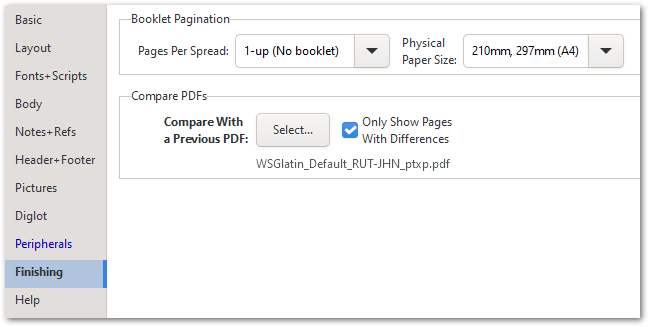
समग्र रूप से, मुझे विश्वास है कि यह चीज़ों के पुराने तरीके से करने की तुलना में अधिक सहज है।
Nice suggestion, @mjames! However, I decided that a more elegant solution was called for, and have just implemented that for release in the next version.
Notice that there is no Create “Diff” PDF button any more, so there is no need to use Ctrl+D to print a Diff; just use Ctrl+P as usual, and if the option is enabled, you’ll get the Diff processing. [But the Ctrl+D shortcut will just toggle that setting for you.]
This also helps to simplify the Basic View slightly:
Overall, I trust that this is more intuitive than the old way of doing things.
English से मशीन-अनुवादित








