Saya baru saja menguji sejumlah font di PTX Print dan LibreOffice Writer. Writer menampilkan huruf kapital kecil di setiap font yang saya uji. Wikipedia mengatakan sebagian besar pengolah kata mengabaikan glyph “huruf kapital kecil asli” secara default, sebagai gantinya mereka memalsukannya dengan memperkecil glyph kapital normal di balik layar. Saya menduga PTXprint tidak menyertakan teknik “palsu” ini untuk huruf kapital kecil.
Di PTXPrint saya, Andika New Basic dan Gentium Basic tidak menghasilkan huruf kapital kecil, tetapi Andika dan Gentium Plus melakukannya. Charis SIL dan Charis SIL Compact juga keduanya “berfungsi” untuk huruf kapital kecil.
Jika huruf kapital kecil di Charis tidak “berfungsi” untuk Anda di PTXPrint, saya bertanya-tanya apakah Anda mungkin perlu memperbarui versi PTX Print Anda atau versi font Charis SIL Anda, atau mungkin keduanya? Mudah dilupakan bahwa sebagian besar item perangkat lunak SIL diperbarui dan ditingkatkan secara teratur.
Saya sangat menduga bahwa Tahoma tidak menyertakan huruf kapital kecil. Periksa spesifikasi Microsoft untuk Tahoma, dibandingkan dengan Calibri di docs.microsoft .com/en-us/typography/font-list
Pembahasan menarik di Wikipedia, jika Anda tertarik: Cari “small caps” di sana.
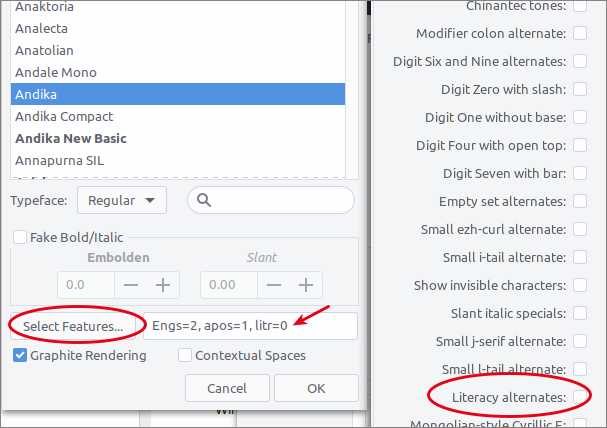
Akhirnya, jika Anda menginginkan font Sans yang terlihat bagus, Anda mungkin bisa mencoba Andika. Andika dikembangkan sebagai font literasi sehingga secara default menggunakan “primer a dan g.” Tetapi Anda dapat mengubah glyph ini di Paratext, PTXPrint, InDesign & LibreOffice menjadi varian “normal” non-literasi. Di tab Fonts+Script PTXPrint, klik pada font Body Text. Pilih Andika. Kemudian centang Graphite Rendering dan klik tombol Select Features di bagian bawah dialog. Untuk Andika dan variasinya, fitur “Literacy Alternates” AKTIF secara default. Hapus centang dan klik OK di dialog Select Features. Anda sekarang harus melihat “litr-0” di sebelah tombol Select Features. Kami juga menggunakan varian Eng dan Glottal, seperti yang dapat Anda lihat di tangkapan layar.
I just tested a number of fonts in PTX Print and in LibreOffice Writer. Writer displays small caps in every font I tested. Wikipedia says most word processors ignore “true small caps” glyphs by default, instead they fake them by scaling down normal capital glyphs under the hood. I’m guessing PTXprint does not include this “fake” technique for small caps.
In my PTXPrint Andika New Basic and Gentium Basic do not produce small caps, but Andika and Gentium Plus do. Charis SIL and Charis SIL Compact also both “work” for small caps.
If small caps in Charis does not “work” for you in PTXPrint, I wonder if you might need to update either your PTX Print version or your Charis SIL font version, or maybe both? It’s easy to forget that most SIL software items are regularly updated and improved.
I strongly suspect that Tahoma does not include small caps. Check out Microsoft’s specs for Tahoma, compared with Calibri at docs.microsoft .com/en-us/typography/font-list
Interesting discussion on Wikipedia, if you are interested: Search for “small caps” there.
Finally, if you want a Sans font that looks good you might try Andika. Andika was developed as a literacy font so it defaults to “primer a and g.” But you can change these glyphs in Paratext, PTXPrint, InDesign & LibreOffice to the “normal” non-literacy variants. In the PTXPrint Fonts+Script tab click on the Body Text font. Choose Andika. Then tick Graphite Rendering and click the Select Features button at the bottom of the dialog. For Andika and its variations the feature, “Literacy Alternates” is ON by default. Untick it and click OK in the Select Features dialog. You should now see “litr-0” next to the Select Features button. We use Eng and Glottal variants as well, as you can see in the screenshot.
Diterjemahkan secara otomatis dari English








