我希望我的 VE(驗證版/回譯版)與我的方言(vernacular)版本具有相同的行間距。
但我不知道可以在哪裡調整我 VE 的行間距。
不知何故,我無法在這裡上傳我的部分截圖。但您可以想像,右側我的方言聖經翻譯採用了寬鬆的 1.5 倍行距,而左側我的回譯(Back translation)則採用了緊湊的 1.0 倍行距。我希望後者也能變成 1.5。
我查看了專案屬性,但找不到任何編輯樣式表的方式。 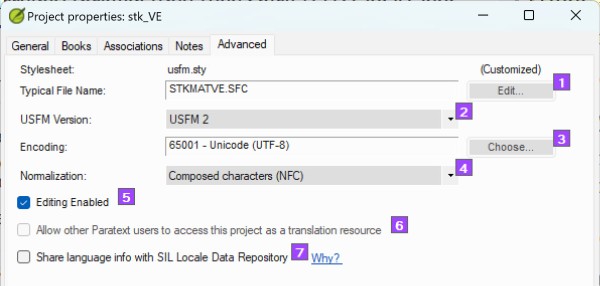
I would like to have the same line spacing for my VE as for my vernacular.
But I don't know where I can adjust the line spacing for my VE.
For some reason, I can't upload some of my screenshots here. But you can imagine, my vernacular Bible translation on the right has an open 1.5 line spacing, while my Back translation on the left has a tight 1.0 line spacing. I want the latter to be 1.5 as well.
I looked up the project properties, but I don't see a way to edit any stylesheets.
機器翻譯自 English








