有人报告说他们无法在 Skype 通话中共享 Paratext 屏幕。
我发现这是可以实现的,但操作并不直观。
当您在 Skype 中点击“共享屏幕”时,Skype 会询问您想要共享哪个应用程序。您可以在此处选择 Paratext,这看起来很直观,但是错误的!以这种方式选择 Paratext 实际上并不会在 Skype 通话中显示 Paratext。
当 Skype 询问要共享什么时,如果您选择左侧通用的 PNP 监视器,然后您可以在屏幕上打开 Paratext,通话方就能看到它。
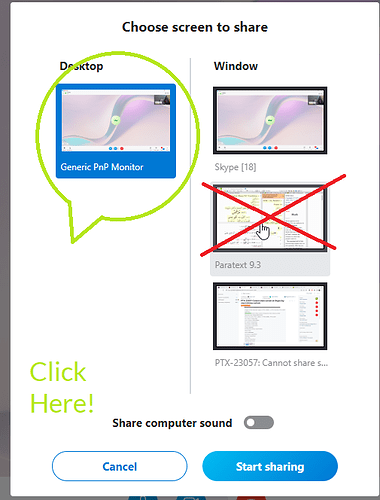
image505×664 69.7 KB
Someone reported they could not share their Paratext screen on a Skype call.
I found it can be done, but it is not obvious.
When you click Share screen on Skype, Skype asks which app you want to share. You can select Paratext here, this seems obvious, but it is WRONG! Selecting Paratext in this way does not actually display Paratext on the Skype call.
If you choose the generic PNP monitor on the left when Skype asks what to share, you can then bring up Paratext on your screen and the caller will see it.
image505×664 69.7 KB
机器翻译自 English








