Une personne a signalé qu'elle ne pouvait pas partager son écran Paratext lors d'un appel Skype.
J'ai trouvé qu'il est possible de le faire, mais ce n'est pas évident.
Lorsque vous cliquez sur Partager l'écran dans Skype, Skype vous demande quelle application vous souhaitez partager. Vous pouvez sélectionner Paratext ici, ce qui semble évident, mais c'est FAUX ! Sélectionner Paratext de cette manière n'affiche pas réellement Paratext sur l'appel Skype.
Si vous choisissez le moniteur générique PNP à gauche lorsque Skype demande quoi partager, vous pouvez ensuite afficher Paratext sur votre écran et l'appelant le verra.
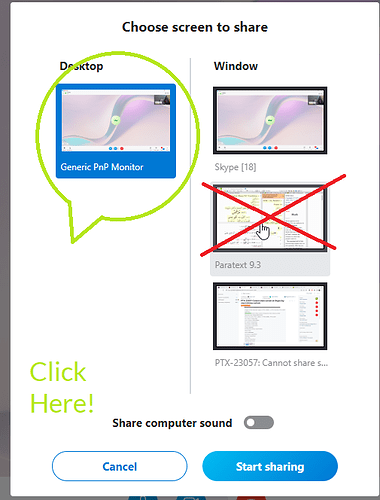
image505×664 69.7 KB
Someone reported they could not share their Paratext screen on a Skype call.
I found it can be done, but it is not obvious.
When you click Share screen on Skype, Skype asks which app you want to share. You can select Paratext here, this seems obvious, but it is WRONG! Selecting Paratext in this way does not actually display Paratext on the Skype call.
If you choose the generic PNP monitor on the left when Skype asks what to share, you can then bring up Paratext on your screen and the caller will see it.
image505×664 69.7 KB
Traduit automatiquement depuis English








