0
234 次瀏覽

我希望 Paratext 開啟時看起來像是全新安裝。我試著按住 Shift 鍵並重設 Paratext,但它沒有清除我的註冊資訊(這對大多數使用者來說是好事)。

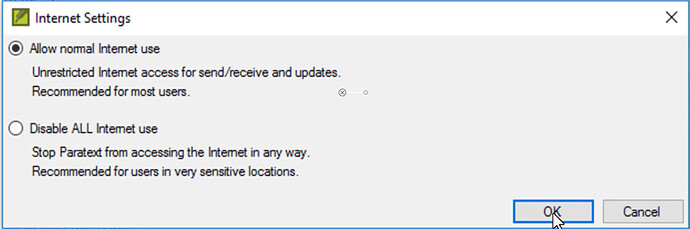
我只是想看看 Paratext 首次安裝時會出現哪些視窗。

就像這個。全新安裝時會出現這種類型的視窗嗎?(此截圖可能需要更新以包含敏感位置選項)。
機器翻譯自 English
Paratext [Moderator]
(2.1k 點) 提出

已重新顯示 | 234 次瀏覽

1 個回答

+1
最佳回答

若要模擬全新安裝,您必須先解除安裝 Paratext,然後刪除所有
C:\Users\{UserName}\AppData\Local\ParatextXX 目錄以及
C:\Users\{UserName}\AppData\Local\United_Bible_Societies 目錄。接著,重新安裝應該會以預設值重新建立這些目錄。這應該能大致模擬完全全新的安裝(您也可以刪除 My Paratext Projects 目錄,並在解除安裝時選擇移除所有設定,以達到更徹底的效果)。

機器翻譯自 English
[Expert]
(16.7k 點) 提出

已重新顯示

感謝您提供這些提示。

我從未見過停用網際網路的選項。在 Paratext 的全新安裝中,現在預設會這樣做嗎?

我也沒有機會輸入我的註冊資訊。我想某處可能有一個登錄表項(registry setting)或類似設定,我需要刪除它?

機器翻譯自 English

當 Paratext 的主要版本(例如 9.3.102.1)首次執行時,如果 C:\Users{UserName}\AppData\Local\ 資料夾中存在先前版本的設定,它會從中複製這些設定。

因此,我懷疑那裡有 Paratext80 … Paratext92 資料夾,而註冊和網際網路設定是從中複製過來的。

機器翻譯自 English

相關問題

0
1 個回答 67 次瀏覽
錯誤訊息為:Paratext 無法儲存專案歷史的變更。這可能表示您專案的本機副本歷史已損毀,您需要從 Send/Receive 伺服器還原專案。 這發生在我正在執行 Send/Receive 的時候,所以我不知道還能做什麼。除了執行 Send/Receive 之外,我該如何從 Send/Receive 伺服器還原專案?
Glenn Kerr 102 提出 已提問 4月 22
0
1 個回答 240 次瀏覽
Navigate to: http://scripts.sil.org/cms/scripts/page.php?site_id=nrsi&id=enccnvtrs Under the Downloads heading, in the SIL ... . See also: How do I add an encoding converter?
[Expert]
anon421222
735 提出
已提問 2月 23, 2017
0
2 個回答 237 次瀏覽
我想在翻譯專案的自訂關鍵詞清單中新增關鍵詞。但我只能找到如何輸入關鍵詞新譯法的說明,卻找不到如何直接在清單中新增更多關鍵詞的方法。有人能幫忙嗎?
anon532188 175 提出 已提問 3月 24, 2021
0
1 個回答 376 次瀏覽
如果您收到訊息,指出您的註冊碼無效或已過期,您需要取得新的 Paratext 註冊碼,並將其輸入 Paratext 從 Paratext Registry 取得新碼 前往位於 https://registry.paratext. ... 由於您的 Paratext 註冊碼無效或已過期,對 Digital Bible Library 的存取已被阻擋
[Expert]
anon421222
735 提出
已提問 2月 23, 2017
Welcome to Support Bible, where you can ask questions and receive answers from other members of the community.
And let us consider how we may spur one another on toward love and good deeds, not giving up meeting together, as some are in the habit of doing, but encouraging one another—and all the more as you see the Day approaching.
Hebrews 10:24-25
3,047 個問題
6,007 個回答
5,672 則評論
2,027 位使用者







