你好 @bit!
很遗憾,我们大约一年前从 PTXprint 界面中移除了这个选项(即为每卷书生成单独的 PDF),原因有三:
(i) 使用这个功能的人非常少(自我们移除该功能以来,你是第二个询问此事的人!)
(ii) 它在代码中引入了许多额外的复杂性,我们不想再处理这些问题
(iii) 通过命令行界面可以实现你所请求的功能(详见下文)
基本上,如果你打开命令提示符并输入以下命令,你将获得仅包含该卷书(例如 MRK)的 PDF:
"C:\Program Files\PTXprint\PTXprint.exe" -c ConfigName -b MRK -P ProjID
现在,通过将该命令包裹在一个包含书卷列表的循环中,它将针对每卷书运行一次,最终你会得到单独的 PDF 文件。以下是作为批处理文件的样子(你需要将黄色高亮的 set 命令中的具体细节替换为你自己的信息):
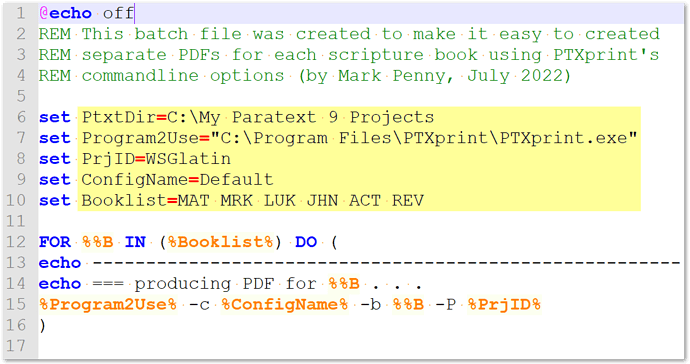
image1095×579 38 KB
解压此 .bat 文件并根据需要编辑:PTXprintAsSeparatePDFs.zip (520 Bytes)
请注意,还有许多其他命令行参数在实际使用时是有效的,尽管常规的 -h(–help)显示没有任何内容 {我们正在解决该问题!}
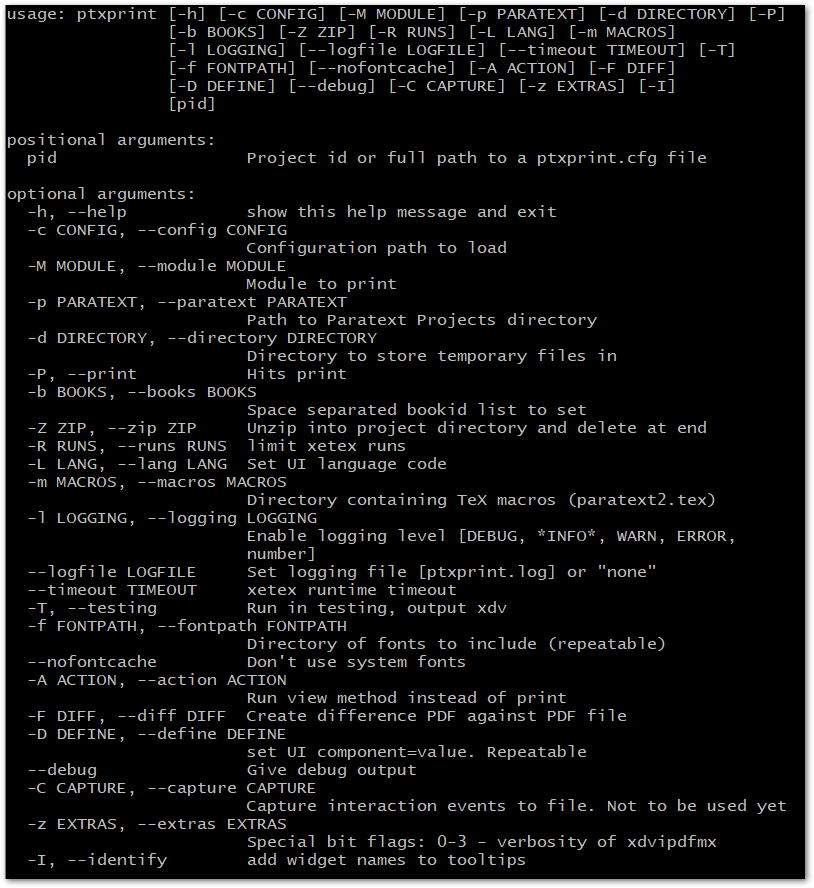
image814×888 28.9 KB
Hi @bit!
Unfortunately we removed this option from the PTXprint UI (to produce individual PDFs for each book) about a year ago due to 3 factors:
(i) very few people used it (you’re the 2nd person who has asked about it since we removed it!)
(ii) it created a lot of additional complications in the code which we would rather not have to deal with
(iii) it is possible to do what you are requesting through the command-line interface (see details below)
Essentially, if you open a command prompt and type in this command, you’ll get a PDF of just that book (e.g. MRK):
"C:\Program Files\PTXprint\PTXprint.exe" -c ConfigName -b MRK -P ProjID
Now, by wrapping that command in a loop with a list of books, it will run it once per book, and you’ll end up with individual PDFs. Here’s what it would look like as a batch file (and you will have to put your own specific details into the set commands highlighted in yellow):
image1095×579 38 KB
Unzip this .bat file and edit as needed: PTXprintAsSeparatePDFs.zip (520 Bytes)
Note that there are many other command-line parameters which actually work when used, even though the regular -h (–help) displays nothing {we’re working on that issue!}
image814×888 28.9 KB
机器翻译自 English








