Hola @bit!
Lamentablemente, eliminamos esta opción de la interfaz de PTXprint (para producir PDFs individuales para cada libro) hace aproximadamente un año debido a tres factores:
(i) muy pocas personas la usaban (¡eres la segunda persona que pregunta al respecto desde que la eliminamos!)
(ii) creaba muchas complicaciones adicionales en el código con las que preferiríamos no tener que lidiar
(iii) es posible hacer lo que solicitas a través de la interfaz de línea de comandos (ver detalles a continuación)
En esencia, si abres un símbolo del sistema y escribes este comando, obtendrás un PDF de solo ese libro (p. ej., MRK):
"C:\Program Files\PTXprint\PTXprint.exe" -c ConfigName -b MRK -P ProjID
Ahora, al envolver ese comando en un bucle con una lista de libros, se ejecutará una vez por libro y terminarás con PDFs individuales. Así es como se vería como archivo por lotes (y tendrás que poner tus propios detalles específicos en los comandos set resaltados en amarillo):
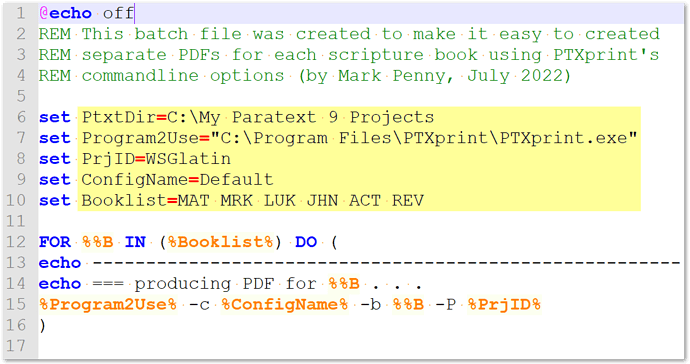
imagen1095×579 38 KB
Descomprime este archivo .bat y edítalo según sea necesario: PTXprintAsSeparatePDFs.zip (520 bytes)
Ten en cuenta que hay muchos otros parámetros de línea de comandos que en realidad funcionan cuando se usan, aunque el -h (–help) regular no muestre nada {¡estamos trabajando en ese problema!}
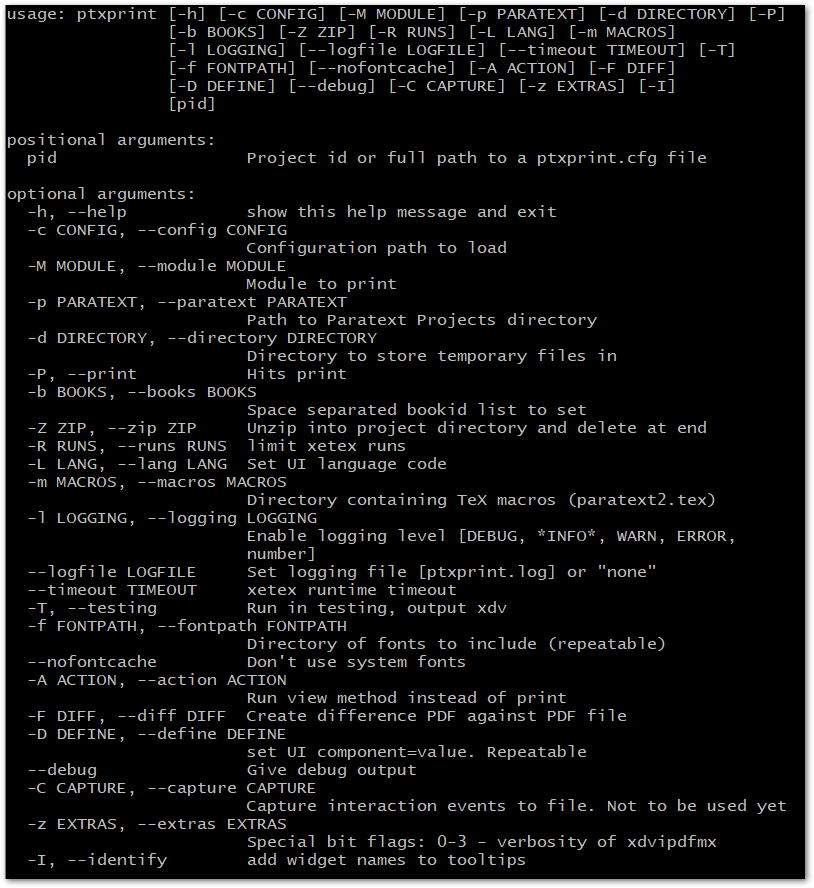
imagen814×888 28.9 KB
Hi @bit!
Unfortunately we removed this option from the PTXprint UI (to produce individual PDFs for each book) about a year ago due to 3 factors:
(i) very few people used it (you’re the 2nd person who has asked about it since we removed it!)
(ii) it created a lot of additional complications in the code which we would rather not have to deal with
(iii) it is possible to do what you are requesting through the command-line interface (see details below)
Essentially, if you open a command prompt and type in this command, you’ll get a PDF of just that book (e.g. MRK):
"C:\Program Files\PTXprint\PTXprint.exe" -c ConfigName -b MRK -P ProjID
Now, by wrapping that command in a loop with a list of books, it will run it once per book, and you’ll end up with individual PDFs. Here’s what it would look like as a batch file (and you will have to put your own specific details into the set commands highlighted in yellow):
image1095×579 38 KB
Unzip this .bat file and edit as needed: PTXprintAsSeparatePDFs.zip (520 Bytes)
Note that there are many other command-line parameters which actually work when used, even though the regular -h (–help) displays nothing {we’re working on that issue!}
image814×888 28.9 KB
Traducción automática desde English








