變更使用者權限:
如果您將其變更為「轉寫(手動)」後無法編輯內容,且需要進行編輯時。
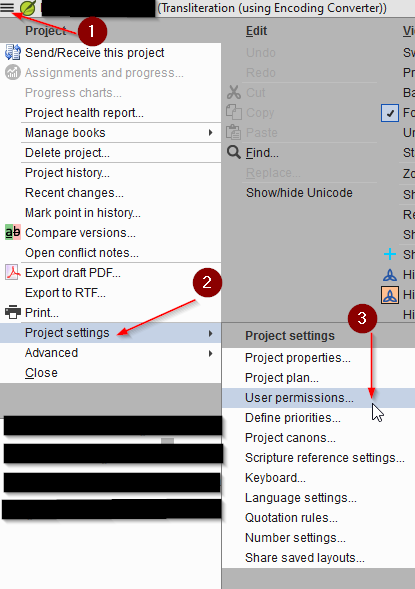
I. 開啟使用者權限
415×589 24.2 KB
II. 開啟書卷權限
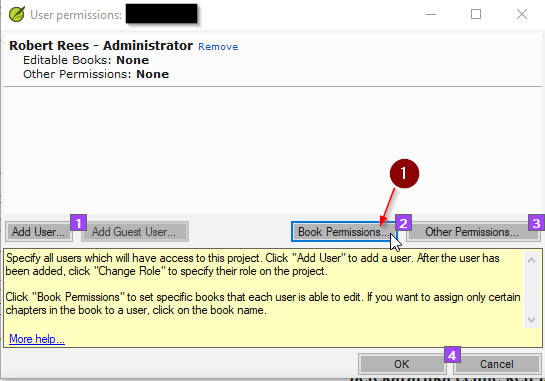
注意: 如果您的帳戶下已有  可編輯書卷:專案中的所有書卷 以及其他權限:術語、譯法、拼寫、經文、進度,則您已準備就緒,可跳過以下步驟;若無,請繼續執行步驟 III。
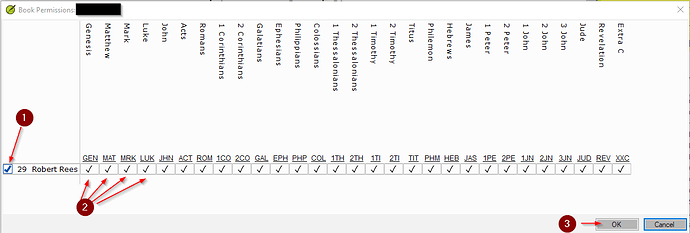
III. 選擇您想要編輯的書卷。
1162×393 20.2 KB
如果您想要全部書卷,只需選擇 1
如果您想要個別書卷,請在您想要編輯的書卷下方打勾。如圖 2 所示。
注意:如果您未選取某本經書,則無法在該書卷中執行「尋找並取代」變更。因此,這也是一種保護特定書卷的好方法。
完成後,請按「確定」。
IV. 然後前往「其他權限」。
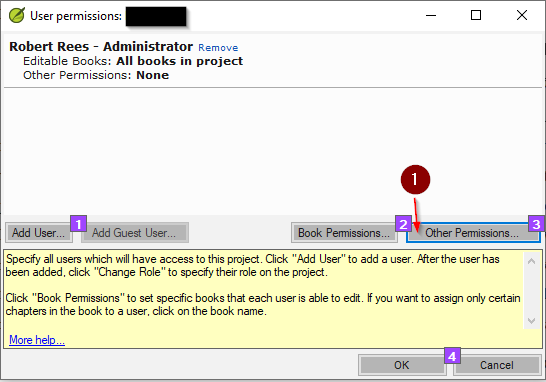
V. 選擇您想要的權限。
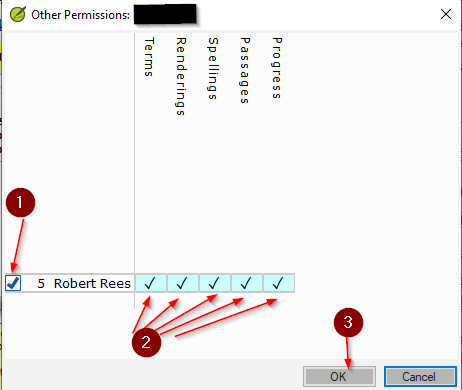
如果您想要全部權限,只需選擇 1
如果您想要個別權限,請在您想要編輯的項目下方打勾。如圖 2 所示。但我建議您選擇全部,這樣您就可以執行任何需要的操作。
完成後,請按「確定」。
1 您會注意到現在您已擁有編輯所有書卷的權限。- 已標記
2 以及「其他權限」。- 已標記
3 按「確定」。
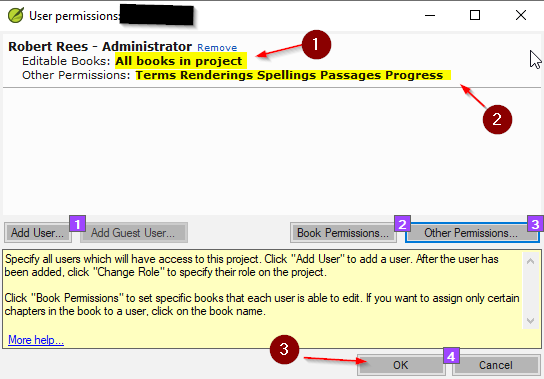
這樣,您應該就能編輯和變更任何需要的內容了。
在祂裡面,
Changing User Permissions:
In case you cannot edit the material after changing it to Transliteration (Manual) and need to edit it.
I. Open User Permissions
415×589 24.2 KB
II. Open the Book Permissions
Note: If you already have Editable Books: All books in project and Other Permissions: Terms, Rendering, Spellings, Passages, Progress under you name you are all set and skip the rest of this if not continue to III.
III. Choose the Books You Would like to Edit.
1162×393 20.2 KB
If you want them all then just choose 1
If you would like individual books put a check mark under the ones you want to edit. As 2 shows.
Note: If you do not select a book you cannot do find and replace changes in that book. So this is a good way to protect a book if you would like.
Once you are done press OK.
IV. Then Go To Other Permissions.
V. Choose the Permissions You Want.
If you want them all then just choose 1
If you would like individual permissions put a check mark under the ones you want to edit. As 2 shows. But I would suggest you chose them all so you can do anything you need.
Once you are done press OK.
1 You will notice that you now have permission to edit all book. - Highlighted
2 And Other Permissions. - Highlighted
3 Press ok.
And thus you should be able to edit and change anything you need.
In Him,
機器翻譯自 English








